Process Type
Graphical expression
Mind Type
Structured expression
Note Type
Efficient expression
Treemap
Bracket Diagram

Default Mode



In software development , MVC (Model-View-Controller) is a timeless architectural pattern. Whether you are a novice programmer or an experienced architect, MVC is a fundamental concept you cannot avoid. It is not only the core idea of many web frameworks (such as Spring MVC, Django, Ruby on Rails, ASP.NET Core), but also a common pattern in desktop application and mobile app development.
So, what is MVC? Why is it so important? How can we clearly express the interaction relationships in MVC using diagrams? This article will systematically explain the principles, advantages, and disadvantages of the MVC model, and, using the ProcessOn diagramming tool, teach you how to visualize the call flow and component relationships in MVC using flowcharts and architecture diagrams.
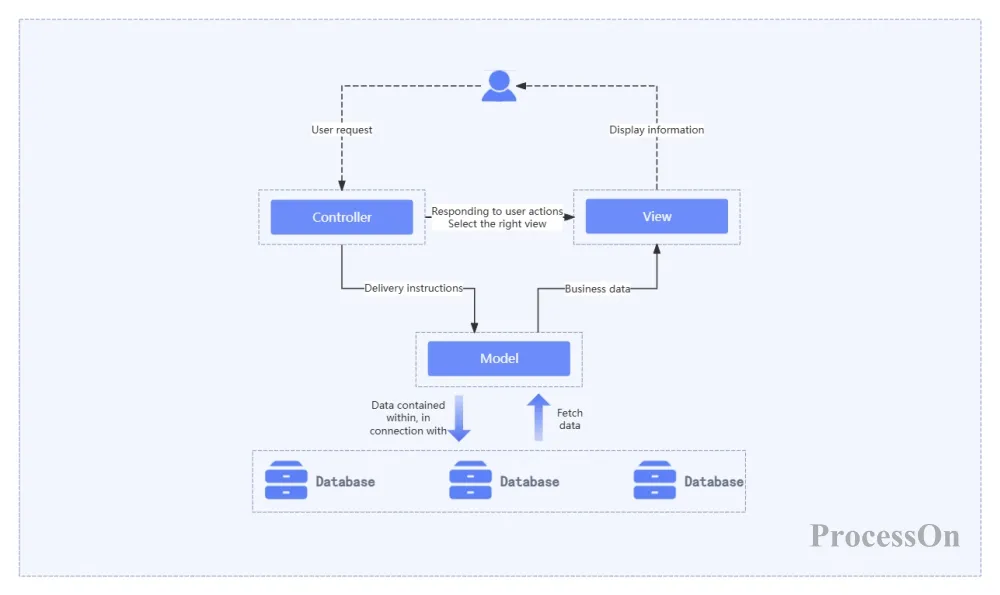
MVC (Model-View-Controller) is a software design pattern that separates the input, processing, and output of an application. It divides the application into three core parts:
Model: Responsible for business logic, data storage, and data validation. It is the core of the application and is independent of the user interface.
View: Responsible for data presentation, i.e., the interface that users see and interact with. It retrieves data from the model and presents it to the user.
Controller: Responsible for receiving user input, processing it in the model, and selecting the view for display. It acts as a bridge between the model and the view.
This separation allows each part to be developed, tested, and maintained independently, improving code reusability and scalability.
Typical MVC Interaction Flow
Users trigger requests through views (such as clicking a button).
The controller receives the request, parses the parameters, and calls the corresponding model method.
The model executes business logic (such as querying the database and performing calculations).
The model returns the results to the controller.
The controller selects the appropriate view based on the result and passes the data to the view.
The view is rendered and displayed to the user.
A model represents the business entities and behaviors of an application. It typically includes:
Data attributes: such as the user's name and age.
Business rules: such as "Age must be over 18 years old".
Data access methods: such as "retrieving a list of users from the database".
State change notification: In the observer pattern, the view is notified to update when the model changes.
The model is independent of the view and controller, so it can be tested independently. For example, a User model can be used to verify its age validation logic using unit tests without starting a web server.
A view is a representation of the user interface. It retrieves data from the model but should not modify that data. The view is only responsible for displaying and receiving user interaction events (such as clicks and input), and then passing the events to the controller.
In web development, views are typically HTML templates; on mobile devices, they may be XML layout files; and on desktop applications, they may be form controls.
The controller is like a "traffic policeman." It:
Parse user requests (such as URL routing and form submissions).
Decide which model to use.
Decide which view to render and pass the required data.
The controller should be kept "thin," meaning it should not contain business logic and should only be responsible for scheduling. Complex business logic should be placed in the model.
Separation of concerns: Clear responsibilities for each layer, reducing coupling.
Maintainability: Modifying the interface does not affect the business logic, and changing the database does not affect the interface.
Testability: The model can be unit tested independently of the UI.
Parallel development: Front-end and back-end can be developed simultaneously, as long as the interfaces are defined properly.
Increased complexity: For simple applications, MVC may be over-designed.
Learning curve: Beginners find it difficult to understand the interactions between the three layers.
There are many files: Model, View, and Controller files need to be created for each function.
Controllers can become bloated: if not careful, all business logic will flood into the controller, turning it into a "fat controller".
As application complexity increases, MVC has spawned several variations:
MVP (Model-View-Presenter): The Presenter replaces the Controller, and the view is completely passive; the Presenter is responsible for updating the view.
MVVM (Model-View-ViewModel): The ViewModel exposes data properties and commands, and the view updates automatically through data binding. This is the core pattern of front-end frameworks such as WPF, Vue.js, and React.
HMVC (Hierarchical MVC): Allows MVC nesting, solving the modularity problem.
Although these patterns have different names, the core idea remains the same: separation of concerns. Understanding MVC is fundamental to learning these advanced patterns.
Creating MVC-related diagrams can help teams understand system design, troubleshoot problems, and write technical documentation. Below are some common MVC diagram types and their creation methods.
Use squares and arrows to represent the Model, View, and Controller modules and their relationships. External entities (users, databases) can be added.
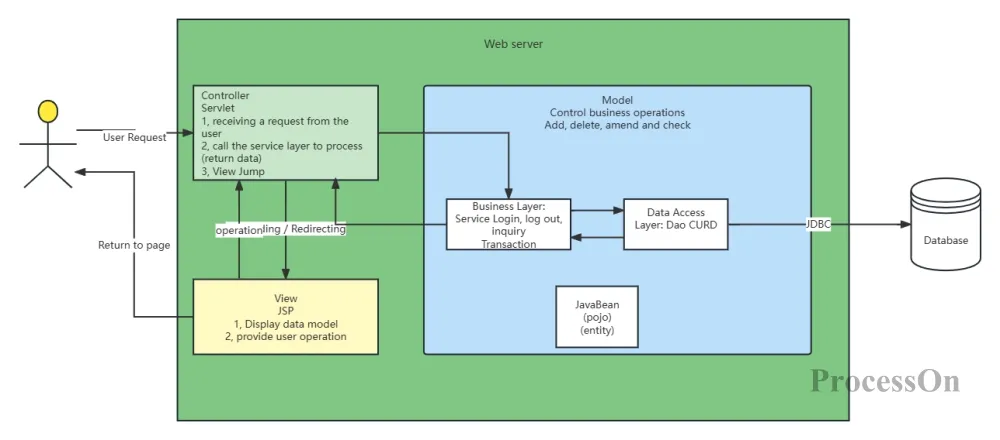
MVC component architecture diagram
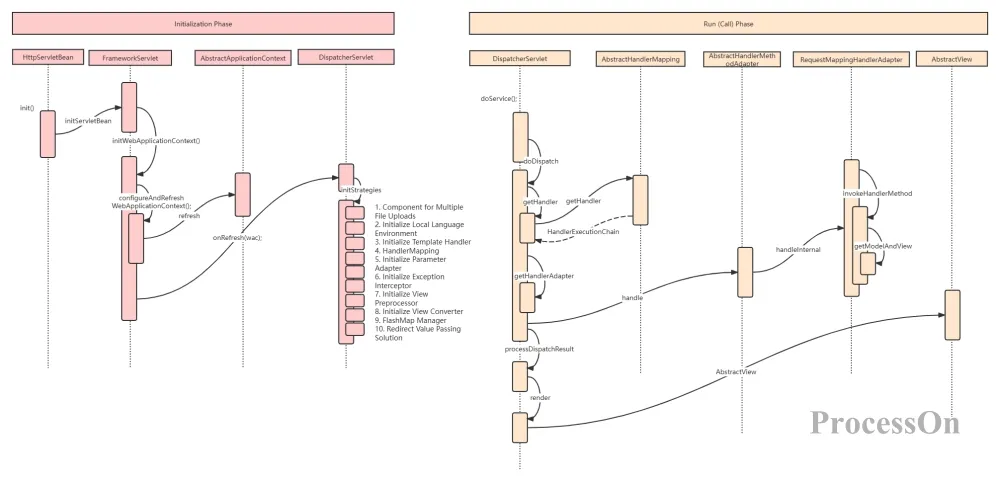
Sequence diagrams are the best way to illustrate the interaction flow of MVC . The following sequence diagram fully presents the collaboration order of the main classes in Spring MVC from startup to request processing, and is a classic illustration for understanding how DispatcherServlet works.
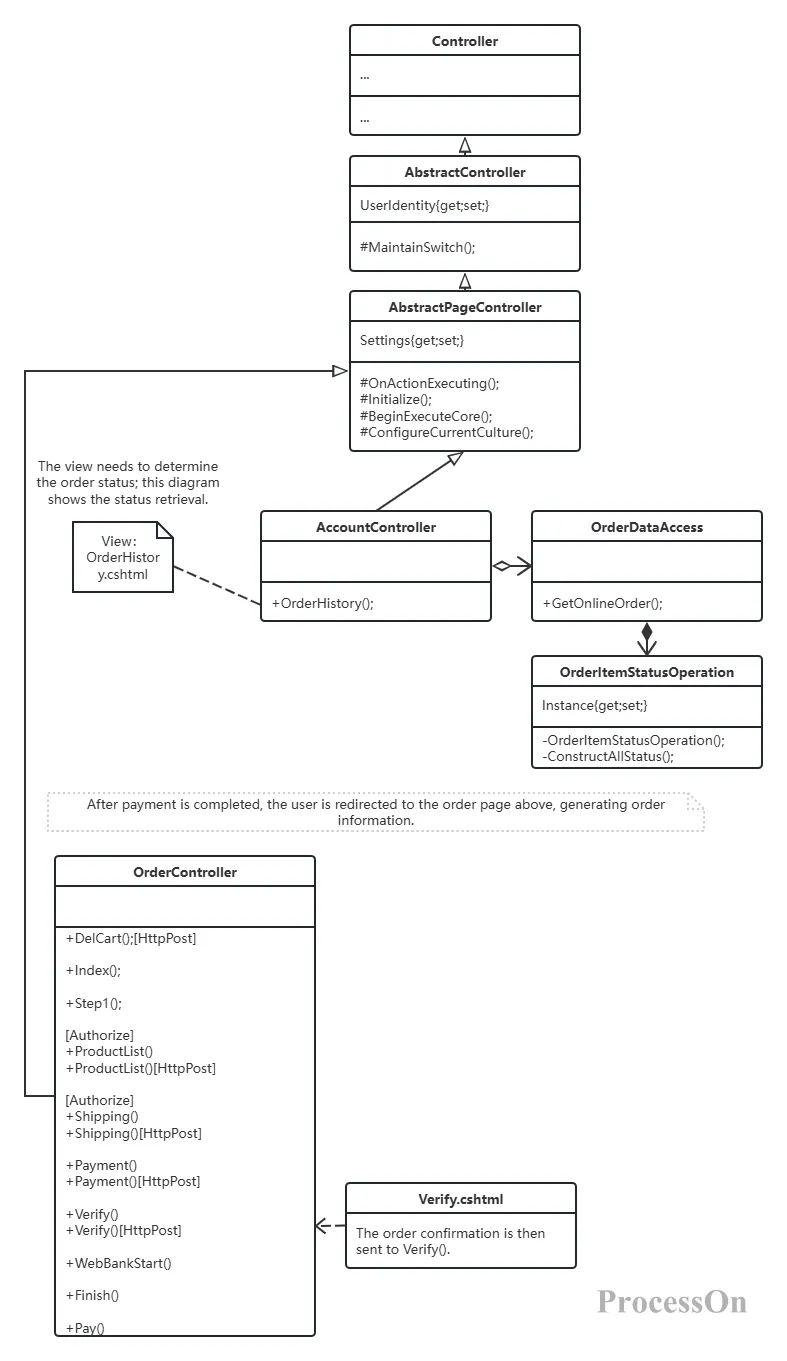
Class diagrams can show the class structure and relationships of each layer in MVC.
1. Log in to ProcessOn , go to your personal file page, select New Flowchart, click "More Graphics" in the lower left corner of the Graphics Library, and select the graphic category you need, such as flowchart or UML diagram.
2. Drag and drop graphic elements from the graphic library on the left onto the canvas. Double-click a graphic to add text content. Use connectors to connect different graphic elements to express the relationships between them.
The layout of each graphic element can be arranged using the distribution alignment function to quickly adjust their position. After the MVC architecture diagram framework is complete, select the graphic components; the top toolbar allows you to set different colors for differentiation. Each modification is automatically saved, allowing you to easily revert to the past and track the architecture's evolution.
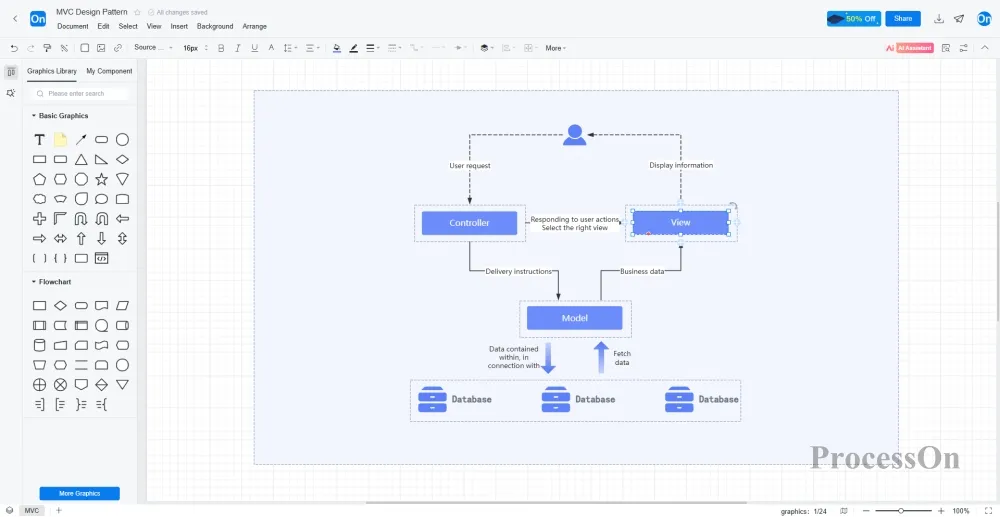
3. Once completed, the file can be downloaded in PNG, PDF, SVG , or other formats. It can also be shared with colleagues or clients for online viewing and editing.
Since its inception in the 1970s, MVC has maintained its vitality. Its core idea—separation of concerns—has become the cornerstone of modern software engineering. Regardless of the programming language or framework you use, understanding MVC can help you write clearer and more maintainable code.
Diagramming tools are powerful tools for visualizing the MVC concept. A good MVC architecture diagram can help new members understand the overall structure of the system within 10 minutes, making architecture reviews more efficient. Now, open ProcessOn and try drawing an MVC interaction sequence diagram of the web framework you are using. You might find that previously vague concepts suddenly become clear.