Process Type
Graphical expression
Mind Type
Structured expression
Note Type
Efficient expression
Treemap
Bracket Diagram

Default Mode





The human resources department is one of the core hubs of a company's operations. From talent recruitment to onboarding training, from performance appraisal to offboarding management, HR's daily work involves a large number of standardized processes. If these processes are only described in writing or communicated verbally, it is not only easy to cause misunderstandings, but also reduces efficiency and increases compliance risks. Workflow diagrams are the best tool to help HR visualize and standardize complex processes.
In this article, I will outline the six core workflow diagrams for HR and introduce how to use ProcessOn to quickly create professional and clear flowcharts, making human resource management more efficient and standardized.
Many HR professionals have this experience:
When a new employee joins the company, all departments are running around like crazy because there's always something missing in the materials.
The recruitment process is opaque, and business departments are complaining, "Why are we still not hired?"
Incomplete handover upon departure and untimely recovery of assets have led to disputes.
These problems essentially stem from unclear processes and ambiguous responsibilities. A good workflow diagram can:
Standardized operation: Every step, every node, and every responsible person is clearly visible;
Visual communication: Enables business departments and management to quickly understand the HR work logic;
Continuous optimization: Review the process using flowcharts to identify bottlenecks and redundant steps;
Compliance documentation: Important processes (such as handling disciplinary actions and resignation) are documented and traceable.
Next, we will break down the six most commonly used flowcharts by HR professionals one by one.
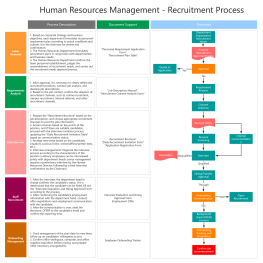
Recruitment is the "face" of HR, involving steps such as confirming needs, posting to relevant channels, screening resumes, conducting interviews, conducting background checks, and issuing offers.
Key nodes in the flowchart:
The hiring department submits a recruitment application → HR reviews and approves the application.
Post job openings (internal/external channels)
Initial resume screening → Secondary screening by hiring department
Arranging interviews (preliminary interview, second interview, final interview) → Filling out the interview evaluation form
Background check (key positions) → Salary negotiation → Offer approval → Offer issuance
Candidate Confirmation → Onboarding Process
Common branches:
Resume not up to standard → Returned to the screening pool or terminated
Unsuccessful interview → Thank-you letter + talent pool addition
Offer rejected → Initiate backup candidate selection
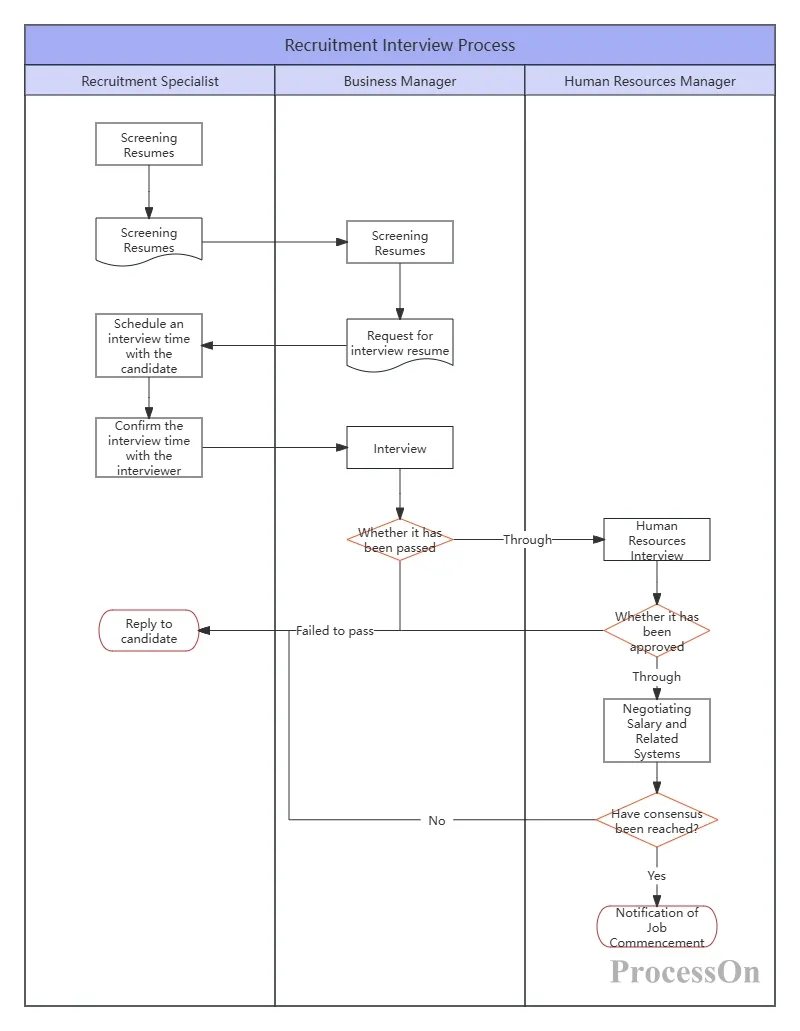
Swimlane diagrams can be used to distinguish different roles (HR, hiring department, candidate, senior management), key approval nodes can be marked with different colors, and the results can be exported as images or PDFs with one click and embedded in recruitment SOP documents.
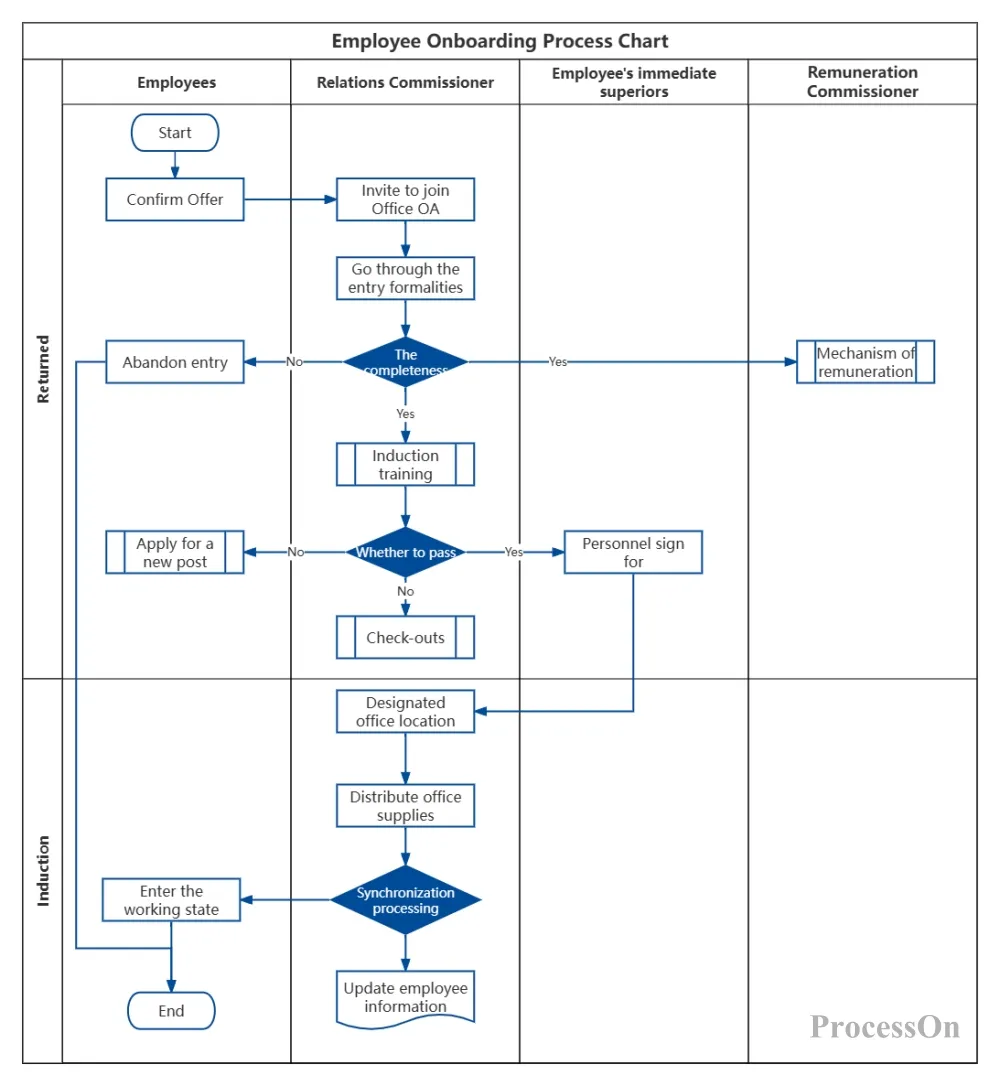
The onboarding process directly impacts a new employee's first impression and is also related to compliance matters such as contracts, social security, and account information.
Key nodes in the flowchart:
New employee confirms start date → Sends onboarding guidance email
The day before starting work: HR prepares workstations, computers, accounts, and onboarding materials.
On the day of joining the company:
Submit originals/copies of identity documents , educational certificates, and proof of termination of employment.
Confirmation of signing labor contracts, confidentiality agreements, and employee handbooks
Open corporate email, OA and other accounts
Receive employee ID and office supplies
Guided tour of the office environment → Introduction of colleagues in this department
Onboarding training (corporate culture, policies, safety, etc.)
From training needs analysis to effectiveness evaluation, a complete training management process helps improve employee capabilities and organizational performance.
Key nodes in the flowchart:
Annual/quarterly training needs surveys (questionnaires, performance reviews, strategy analysis)
Develop training plan → Approval
Internal training: Selecting internal trainers and developing courses
External training: Supplier selection and agreement signing
Publish training notice → Employee registration
Organization and implementation (venue, registration, materials)
Training effectiveness evaluation (Level 1 response evaluation, Level 2 learning evaluation)
Training records should be archived (courseware, attendance sheets, assessment results).
Follow up on post-training behavioral changes (Level 3 behavioral assessment, optional)
Common branches: training cancellation, supplementary training for those who fail to meet the standards, etc.
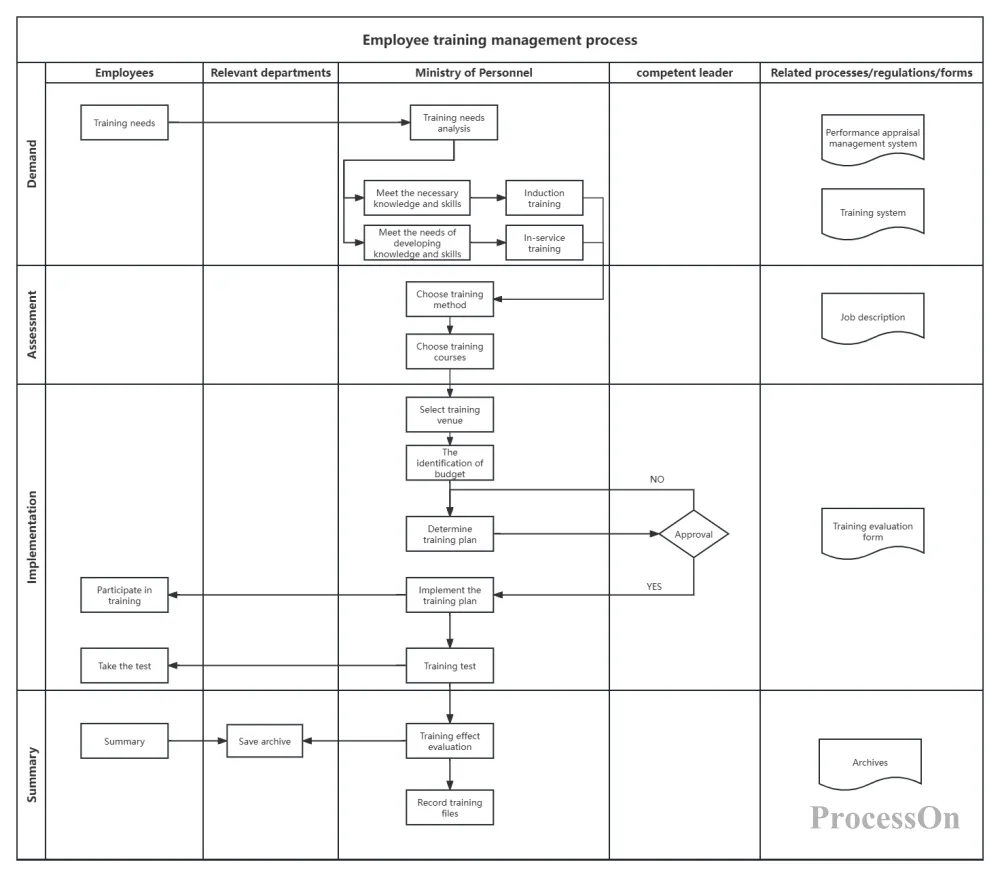
Corporate Employee Training Management Process
You can add links to the nodes of the flowchart, linking them to specific training course schedules and assessment questionnaire templates; you can also create sub-processes for different training programs and jump to them via hyperlinks.
Performance management is not about year-end scoring, but rather a year-round PDCA cycle.
Key nodes in the flowchart:
Goal setting phase:
Company goals are broken down to departments → Department goals are broken down to individuals
Employees draft their own performance plans → Communicate and confirm with their supervisors
Performance execution and coaching:
Regularly check progress (weekly/monthly meetings)
The superior provides resource support and feedback.
Employees record key events
Performance evaluation phase:
Employee self-evaluation → Supervisor evaluation → Cross-departmental evaluation (360-degree optional)
Calibration will be conducted (to avoid bias in the scoring distribution).
Result Confirmation and Signature
Application of results:
Performance bonuses/salary adjustments/promotions/training/improvement plans
Performance reviews and improvements:
Face-to-face feedback → Develop improvement plans for the next cycle
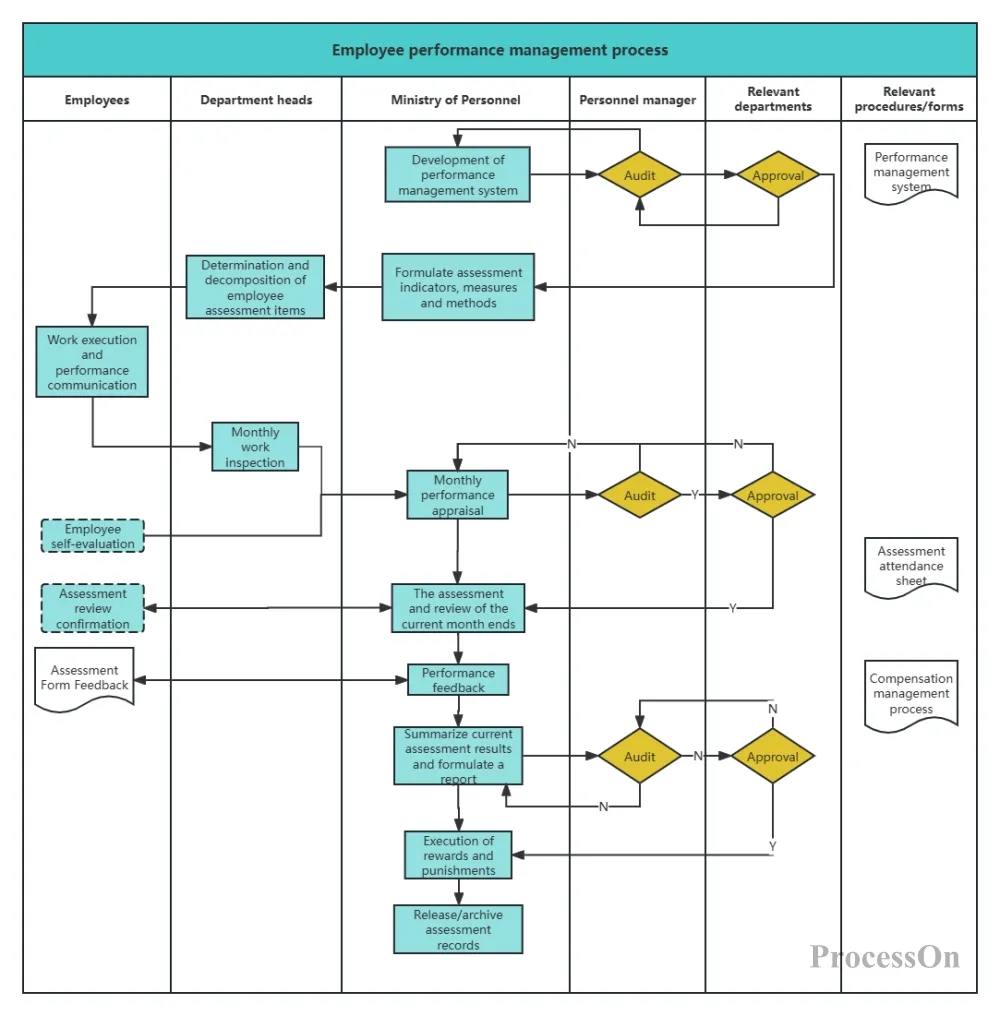
Employee performance management process
Salaries are a matter of vital interest to employees, and must be paid on time and without error.
Key nodes in the flowchart:
Collect attendance data (late arrivals, early departures, leave requests, overtime work).
Collect performance results (part linked to compensation).
Collect information on changes in social security and individual income tax
Calculate gross wages, deductions, and net wages.
Salary review (HR manager + finance)
Prepare pay slips (electronic or paper).
Bank quote → Finance approval and payment
Salary Report Archiving
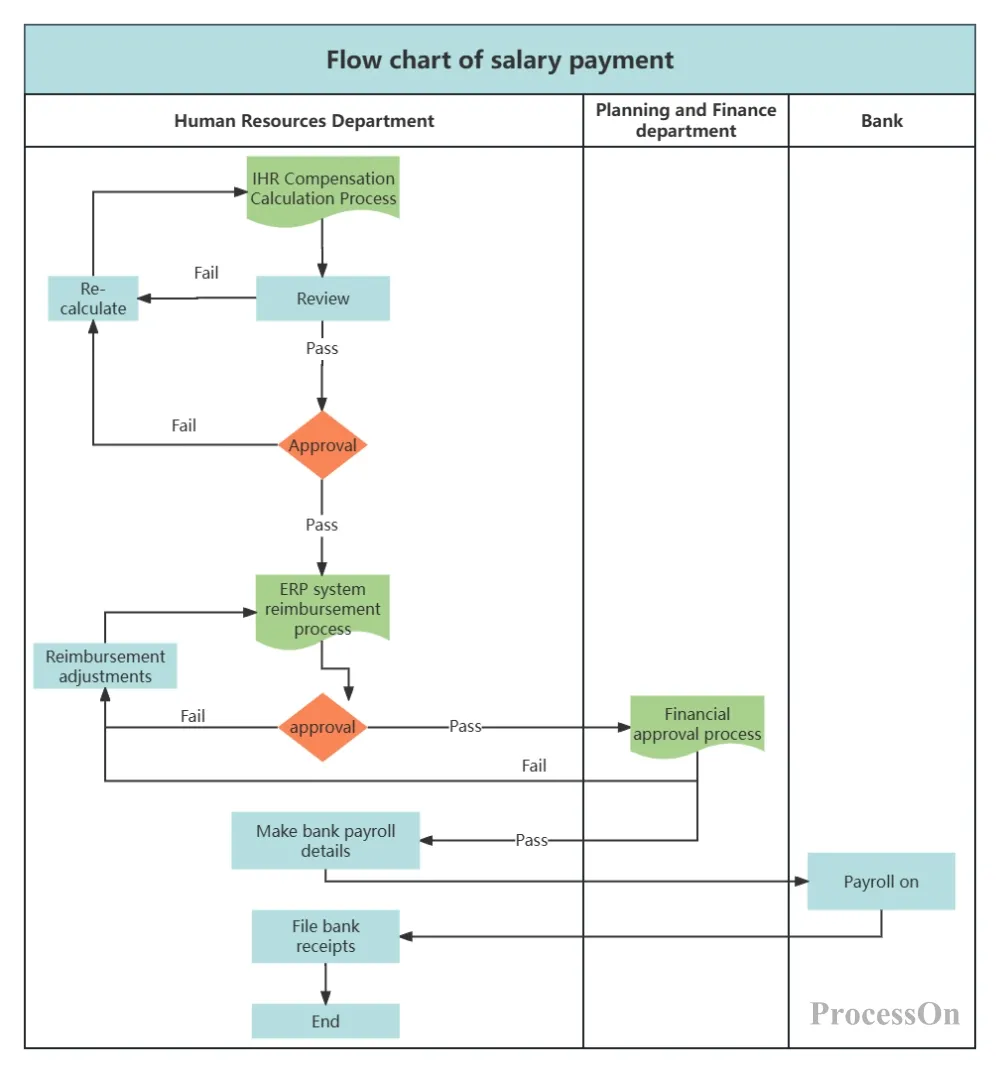
Employee payroll calculation and disbursement process
Whether an employee departure management system is standardized directly affects a company's risk of labor disputes and its employer brand.
Key nodes in the flowchart:
Employees submit their resignation applications (in writing or through the system).
Exit interview (to understand the reasons and attempt to retain the employee)
Approval process: Direct supervisor → HR → General Manager (according to authority)
Work handover: Transfer of departmental work documents and project materials
Asset handover: Computers, mobile phones, access cards, keys, important documents
Financial settlement: remaining salary, reimbursement, and penalty for breach of contract (if any).
Issuance of Certificate of Termination of Employment Contract
Social Security Suspension/Transfer
Delete system accounts, corporate emails, and access control permissions.
Filing of resignation files
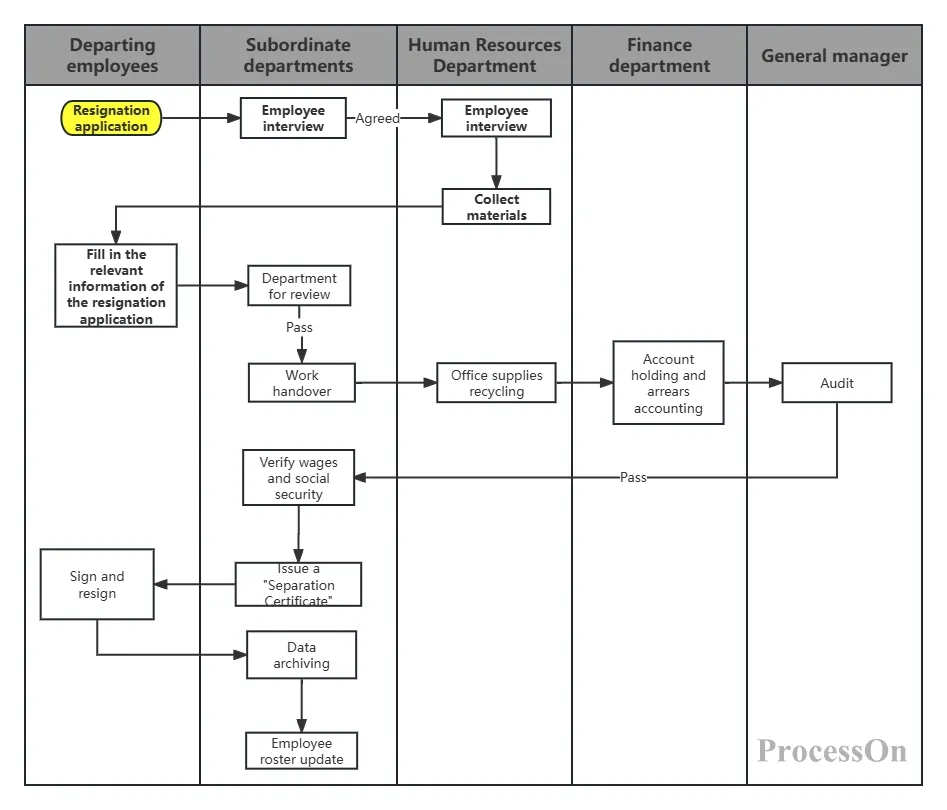
All six processes mentioned above can be quickly implemented in ProcessOn. ProcessOn is an online flowchart, mind map, and UML diagram tool, especially suitable for HR teams.
Massive Template Library: Search for keywords such as "recruitment process", "onboarding flowchart", and "resignation process" in the template community to find ready-made professional templates that can be reused with one click and modified more efficiently.
Drag-and-drop operation: No drawing skills required. Simply drag shapes from the left-hand library to the canvas, and the connecting lines will automatically snap and align.

Team collaboration: Multiple HR team members can simultaneously edit a single flowchart, comment and communicate, and save in real time, eliminating the need for repeated file transfers.
Multiple format export: Supports exporting to PNG, JPG, PDF, Visio and other formats, making it convenient to put into policy documents, PPTs or print and post.
Cloud storage: All files are automatically saved, and historical versions are traceable, so you'll never have to worry about losing them after modification again.
The future trends of human resource management are "lean" and "digital," and workflow diagrams serve as the bridge connecting the two. By visualizing the six core processes of recruitment, onboarding, training, performance, compensation, and turnover, HR professionals can free themselves from tedious transactional communication and focus on more valuable strategic partnerships.
Visit the ProcessOn website and register to use it for free. Search for "HR" or "Human Resource Management" in the template library to start creating your first workflow diagram !