Process Type
Graphical expression
Mind Type
Structured expression
Note Type
Efficient expression
Treemap
Bracket Diagram

Default Mode





Anyone who has done system design or written technical documentation should know that sequence diagrams look simple, but they are really hard to draw.
How should the objects be arranged? Should message arrows be solid or dashed? What's the appropriate length for activation bars? Should combined fragments be alt or opt? Memorizing a whole set of UML specifications is enough to make your head spin. Not to mention discovering logical omissions after drawing them, requiring adjustments from scratch—it's like spending two hours drawing and a whole day revising.
But things are different now. ProcessOn AI recently upgraded its time series diagram generation capabilities. Simply input your requirements, and AI will generate professional-grade time series diagrams in seconds, completely transforming the process of drawing diagrams into something as simple as "speaking out".
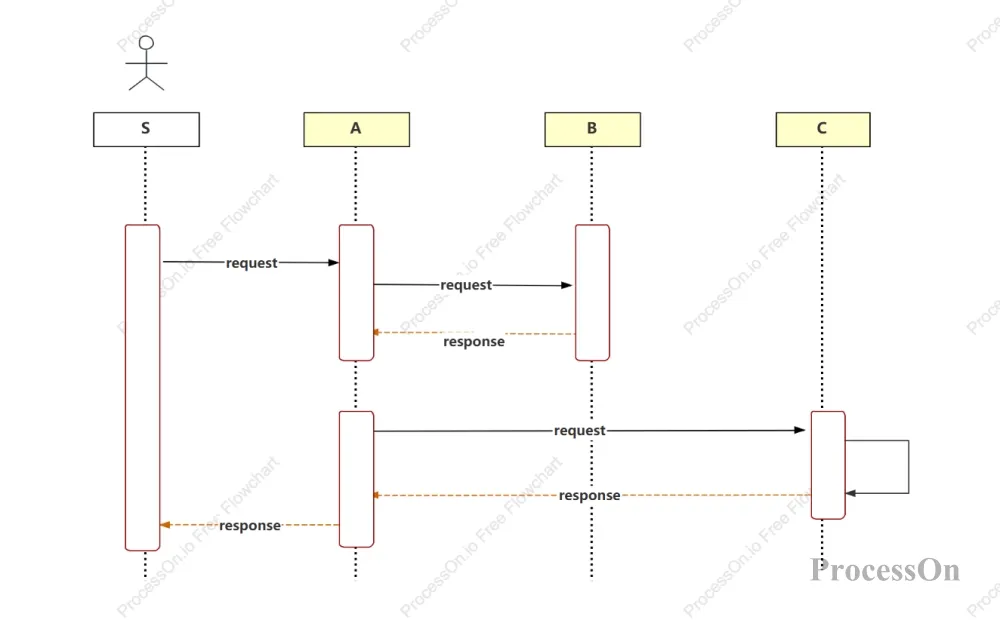
A sequence diagram, also called a sequence diagram, is a type of interaction diagram in UML (Unified Modeling Language). It is mainly used to illustrate the process of messages being passed between objects in chronological order.
Simply put, a time series diagram is a two-dimensional chart:
Horizontal axis: The objects involved in the interaction (such as users, front-end, back-end, database).
Vertical axis: Time flows from top to bottom.
The arrow in the middle: Messages passed between objects.
Sequence diagrams are particularly suitable for describing:
User login process (interaction sequence of user → front-end → back-end → database)
Order payment process (the complete chain of order placement → payment → callback → shipment)
API call relationships (Service A calls Service B, and Service B then calls Service C)
In the past, when drawing sequence diagrams, you had to first figure out which objects were involved, then figure out the message order, and then consider the branching logic... But now, you only need to clearly state your requirements, and leave the rest to AI.
On the ProcessOn website homepage, click the [AI] button, or on your personal file page, click [Create from AI] on the left.
Then, on the AI landing page, select "AI Sequence Diagram" to enter the AI generation mode.
In the input box, as if communicating with a colleague, clearly state your sequence diagram requirements. For example:
"Generate a timeline of a user's leave request: the employee submits the application, the direct supervisor approves it, HR files it, and if the leave exceeds 3 days, it also needs the director's approval."
Or a more complex scenario:
"Generate a sequence diagram of the train ticket booking process, including users, front-end, ticketing system, payment system, database, and queuing system. It should reflect the entire process of checking tickets, locking seats, payment, and ticket issuance, and also handle abnormal situations such as no tickets available and payment failures."
After receiving the instruction, the AI will generate a sequence diagram that is logically clear, structurally complete, and conforms to UML specifications within 10 seconds.
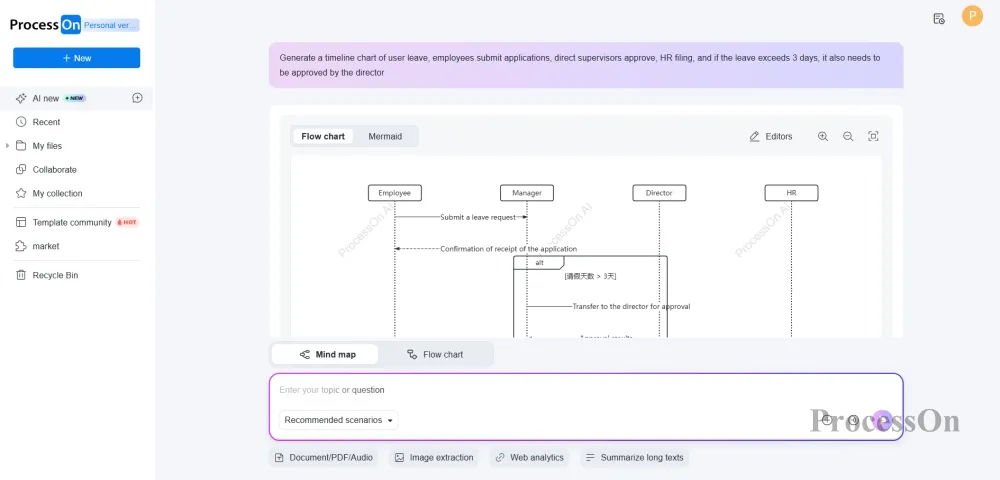
Once you're satisfied, click the "Edit" button to enter the professional editor, where you can make final adjustments to the details—change the text position, adjust the layout, and add comments.
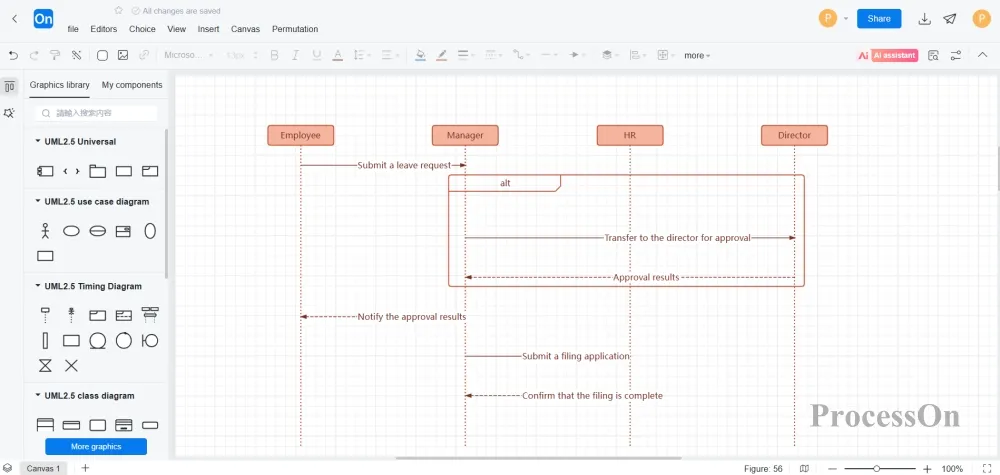
Finally, you can directly export the format you need: high-definition PNG/JPG for documents, vector SVG for papers, and Visio format for colleagues—all are supported.
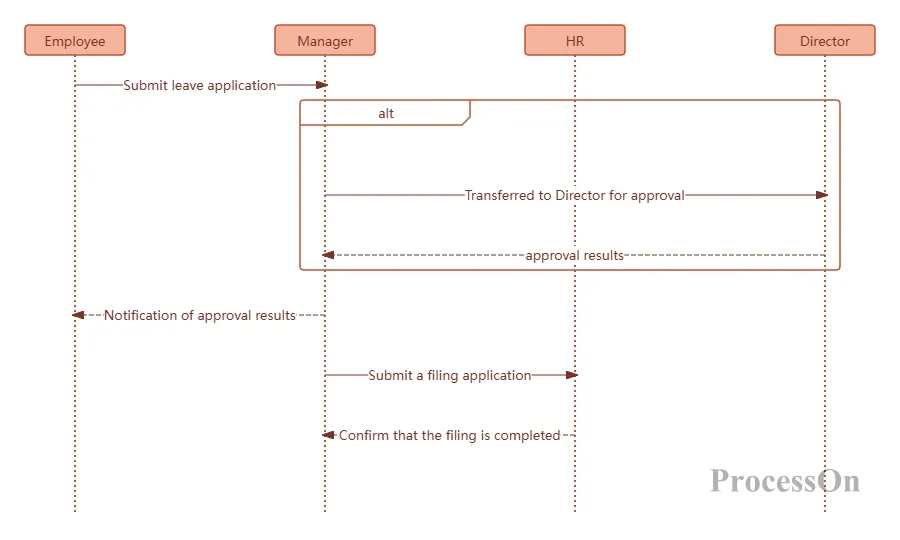
Let's take a look at the actual generation results after ProcessOn AI's recent upgrade:
This AI-generated leave application process diagram is rigorous and complete in terms of business logic, with no logical loopholes. It closely resembles the leave application process in our real work, clearly showing the entire interaction sequence and branch logic from the initiation to the end of the leave approval process. It also strictly follows the UML drawing specifications, with professional and accurate syntax, making it a high-quality deliverable that can be directly implemented.
This UML sequence diagram of the entire train ticket booking process covers six major roles: user, front-end, ticketing, payment, database, and queuing system. It uses alt branches to fully present the three core decision logics: ticket inquiry, seat locking, and payment.
Users first check ticket availability. If tickets are available, they confirm the purchase and enter the queue to lock a seat. Once the seat is successfully locked, they are redirected to payment. If payment is successful, the ticket is issued and the status is updated. If payment fails, there are no tickets available, or the seat lock fails, the seat will be automatically released and a failure notification will be sent, thus achieving a closed loop from query to ticket issuance and abnormal rollback.
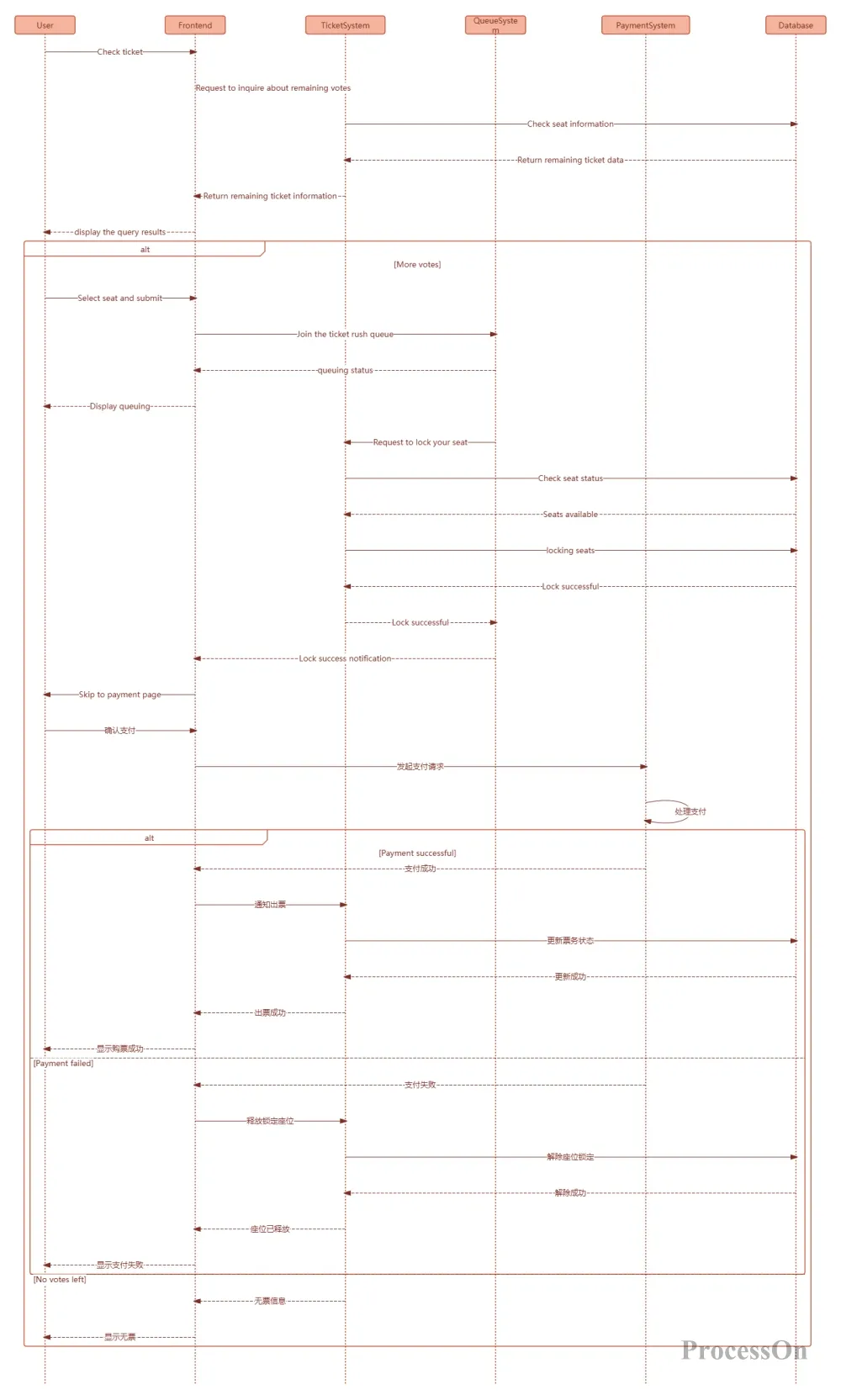
This complex branching logic and exception handling, which used to take at least half an hour to draw manually, can now be generated by AI with a single click, precisely and accurately.
The key to drawing sequence diagrams with AI is clearly stating your requirements. Here are a few tips:
1. State the main points first, then add details.
Don't expect to dump all the details on AI at once. You can start by saying "generate a sequence diagram for user login" to draw the basic framework, and then add details such as "add CAPTCHA verification" and "add login failure lockout logic".
2. Use technical terms
AI models are trained on massive amounts of technical documents and can accurately understand UML specifications and technical terminology. Saying "add alt combination fragment to represent a branch" is more effective than saying "draw a decision box"; saying "use asynchronous messages" is more accurate than "draw a dashed arrow".
Although AI can generate these automatically, understanding some basic knowledge can help you better define your requirements and check the results.
The three core elements of a sequence diagram:
Object: A character involved in the interaction, placed at the top of the diagram and represented by a rectangle. There are three naming conventions:
Displays the object name and class name: "Apple Phone: Phone"
Display only the object name: "Apple Phone:"
Only display the class name: ":Mobile Phone"
Lifeline: A vertical dashed line below an object, indicating the length of time the object has existed.
Message: An arrow between objects indicates the message being passed.
Synchronous messages (solid arrow): Require waiting for a response after sending (e.g., API calls).
Asynchronous messages (solid line + greater than sign): Execution continues after the message is sent (e.g., sending to a message queue).
Return message (dashed arrow): The result returned from the call.
Combined Fragment:
This is the area in a sequence diagram representing logic control. There are 13 types, the most commonly used being:
alt: Select one branch (if-then-else)
opt: Optional branch (if condition)
loop: executes in a loop.
par: parallel execution
Knowing these terms will allow you to more precisely instruct AI: "Add an alt branch at this location to handle both success and failure scenarios."
Sequence diagrams are essentially communication tools used to organize and visualize the interaction logic of a system. Previously, we spent a lot of time drawing boxes, adjusting alignment, and memorizing specifications, essentially using manual labor to mask a lack of thoughtful consideration.
Now with AI, you can truly focus your energy back on the design itself—think clearly about what interactions your system needs, how to handle logical branches, and how to handle exceptions, and then let the tool help you turn your ideas into a professional, clear, and one-shot sequence diagram.
Good tools aren't about teaching you more skills, but about minimizing interruptions. This upgrade to ProcessOn AI aims to help you focus your time on what truly matters.