Process Type
Graphical expression
Mind Type
Structured expression
Note Type
Efficient expression
Treemap
Bracket Diagram

Default Mode





Procurement is an indispensable part of business operations, involving almost every department from raw material procurement and equipment purchase to office supply requisition. However, many companies' procurement processes suffer from numerous problems: chaotic approval processes, unclear responsibilities, lax supplier management, and long payment cycles. These issues can lead to inefficiency at best, and compliance risks or even corruption at worst.
How can we make procurement management standardized, transparent, and traceable? The answer is: create a clear procurement flowchart. This article will systematically explain what a procurement flowchart is, its core value, standard symbols, and the steps to create one, and will share several professional procurement flowchart templates .
A procurement flowchart is a tool that graphically describes the entire procurement process of a company. Based on the company's procurement strategy, internal control requirements, and supply chain characteristics, it breaks down procurement activities into a series of orderly steps, each clearly defining its inputs, outputs, responsible parties, and decision-making rules. It covers all stages from the submission of procurement needs to the final payment, including price inquiries, price comparisons, supplier selection, order approval, goods receipt and inspection, invoice verification, and fund disbursement.
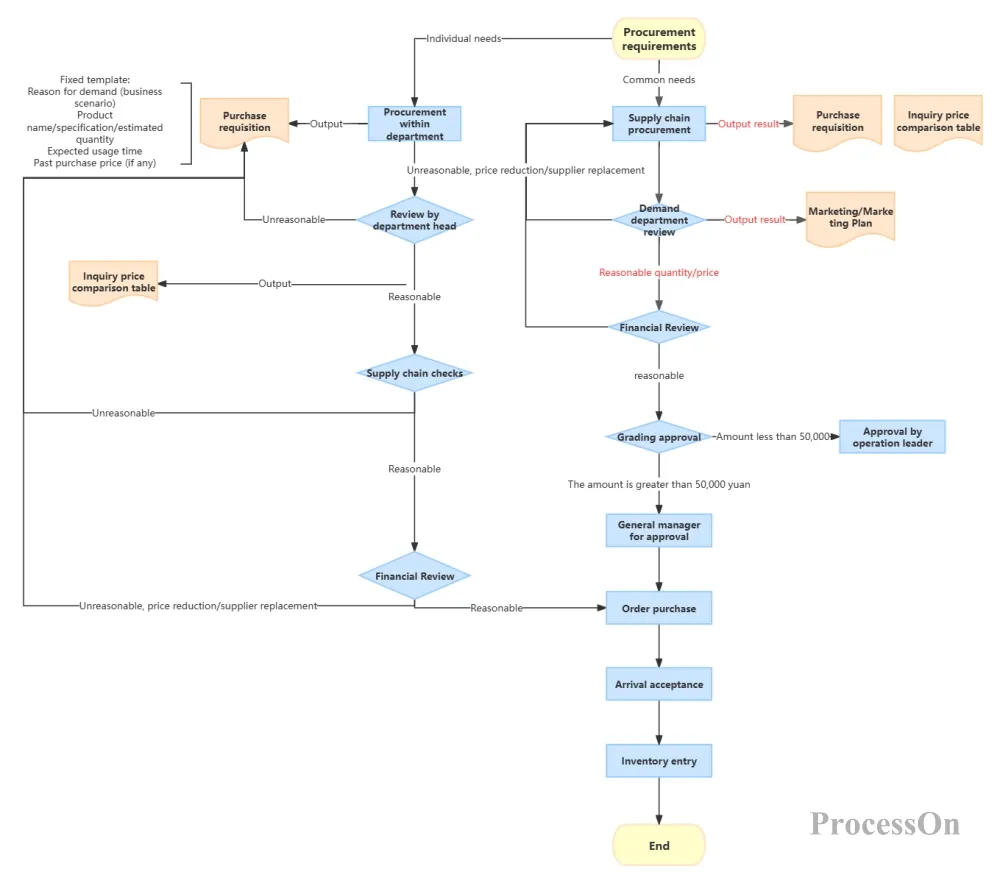
Procurement Standard Flowchart
Through the procurement flowchart, companies can:
Clearly define the responsible departments and positions for each step;
Set up necessary control points (such as budgetary/extra-budgetary approval, and green channels for emergency procurement);
Identify bottlenecks and redundancies, and optimize processes;
Provide standard operating procedures for new employees;
To provide a basis for auditing and internal control.
Depending on the size of the company and the characteristics of its procurement, the procurement process can be divided into several types, and the corresponding flowcharts also differ:
General procurement process: applicable to non-production materials or low-value procurement, with relatively simple steps.
Bidding and procurement process: Applicable to bulk or high-value procurement, involving complex steps such as bidding announcement, bidding, and bid evaluation.
Emergency procurement process: Simplified approval process for sudden needs, but approval must be obtained afterward.
Framework agreement procurement process: Sign long-term agreements with suppliers, and place orders directly for each purchase.
Import procurement process: Involves special procedures such as customs declaration, commodity inspection, and foreign exchange.
Regardless of the type, the core processes are the same. Below, we will explain in detail using the most typical general procurement process as an example.
Roles: Demands department, procurement department, finance department, senior management, suppliers.
Activity: Submit application, request price, compare prices, approve, place order, receive goods, inspect, and make payment.
Assessment points: Is the budget exceeded? Is bidding required? Has the acceptance test passed?
Documents/Forms: Purchase requisition, inquiry, quotation, purchase order, warehouse receipt, invoice.
Flow direction: the order and data transfer between activities.
Similar to business process diagrams, commonly used symbols include:
Rounded rectangle/rectangle: activity (such as "fill out a purchase requisition form").
Diamond: Judgment/Decision (e.g., "Does the amount exceed 50,000?").
Parallelogram: Input/output documents (such as "Purchase Orders").
Swimming lanes (horizontal/vertical divisions): distinguish different roles.
Arrow: Direction of flow.
Circle: Start/End.
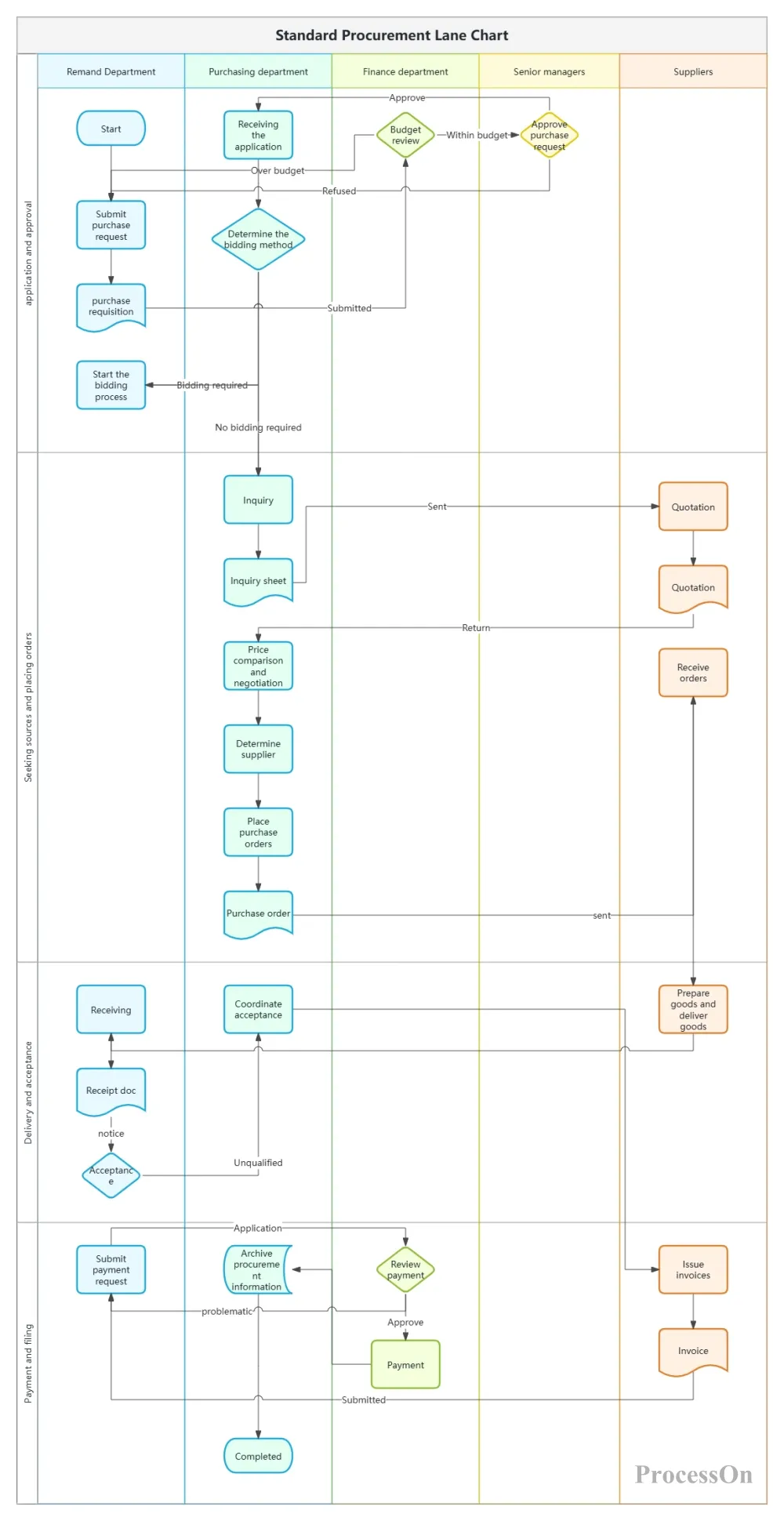
Typical Procurement Flowchart - Swimlane Diagram
Step 1: Define the scope and objectives of the process . Determine the starting point (employee submits procurement request) and the ending point (financial payment completed) of the process to standardize procurement behavior and prevent risks.
Step 2: List all involved roles , such as demand staff , department managers , purchasing specialists , purchasing managers , suppliers (external) , warehouse managers , finance personnel , etc.
Step 3: Write down the main activities in chronological order .
Step 4: Draw a swimlane diagram (cross-functional flowchart)
In ProcessOn, create a new chart by selecting the "Swimlane Chart" template. Set the swimlanes horizontally or vertically , place the active nodes, and add decision criteria .
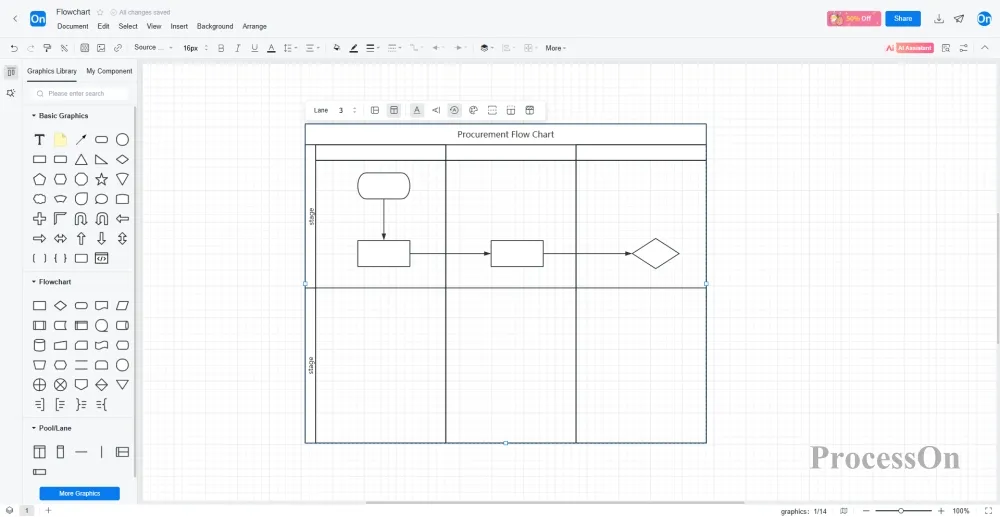
5 : Confirm with relevant departments whether the flowchart matches the actual process. Discussion points may include: Is there a fast track for emergency procurement? How are returns and exchanges handled? What happens if goods fail acceptance? These abnormal processes can be supplemented as sub-processes.
6 : Export the complete procurement flowchart as a PNG or PDF file, embed it in the procurement policy document, or print and post it in the procurement department.
A mature procurement flowchart should not only have a "happy path," but also consider various possible abnormal situations:
Approval rejection: If the department manager rejects the application, it will be returned to the employee who requested the application for modification or cancellation.
Price Exceeds Budget: If the price comparison result exceeds the budget, a new price inquiry or bidding process must be initiated.
If the goods fail to meet the acceptance criteria: return them to the supplier, record the quality abnormality, and request a replacement or refund.
Invoice discrepancy: If the invoice does not match the order amount or quantity, it will be returned to the supplier for reissue.
Emergency procurement: Skip some approvals, but sign them off afterwards and state the reason.
These branches can be represented using diamond-shaped decision boxes and multiple exits. For example, after the "Acceptance" node, add a "Qualified?" judgment: Yes → Goods accepted; No → Goods returned.
ProcessOn offers a wealth of procurement flowchart templates and examples for reference, and supports cloning for easier drawing. Below are some shared templates.
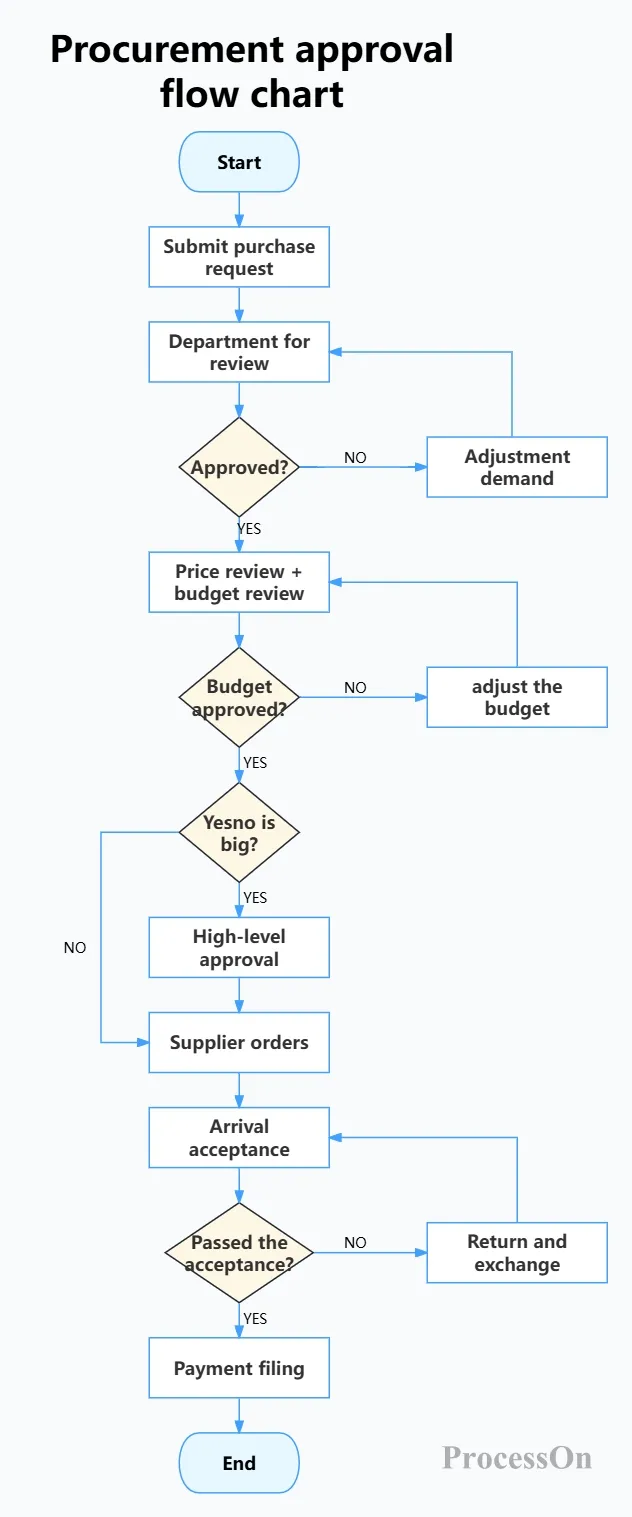
General Procurement Approval Flowchart
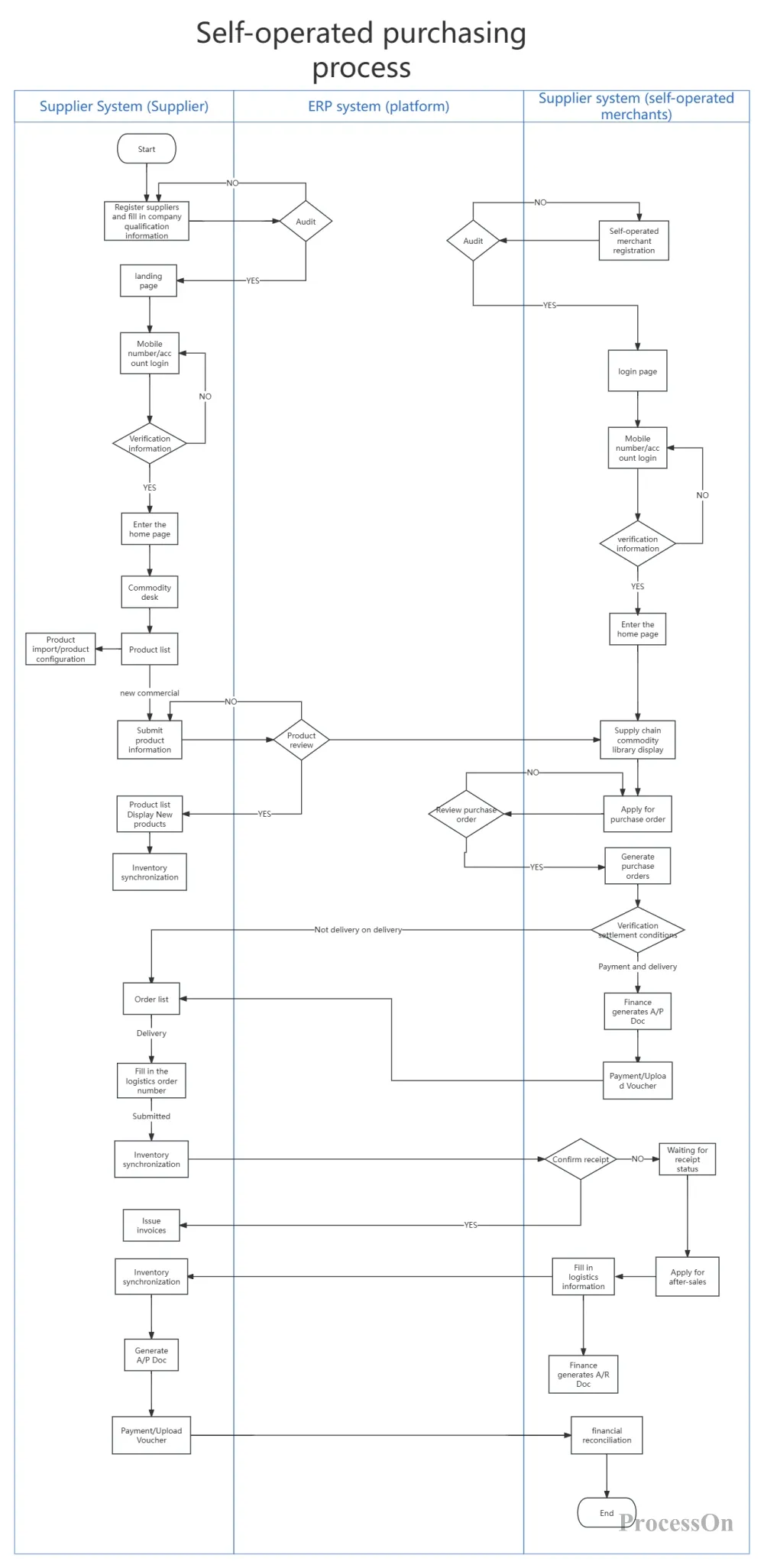
Self-operated procurement flowchart
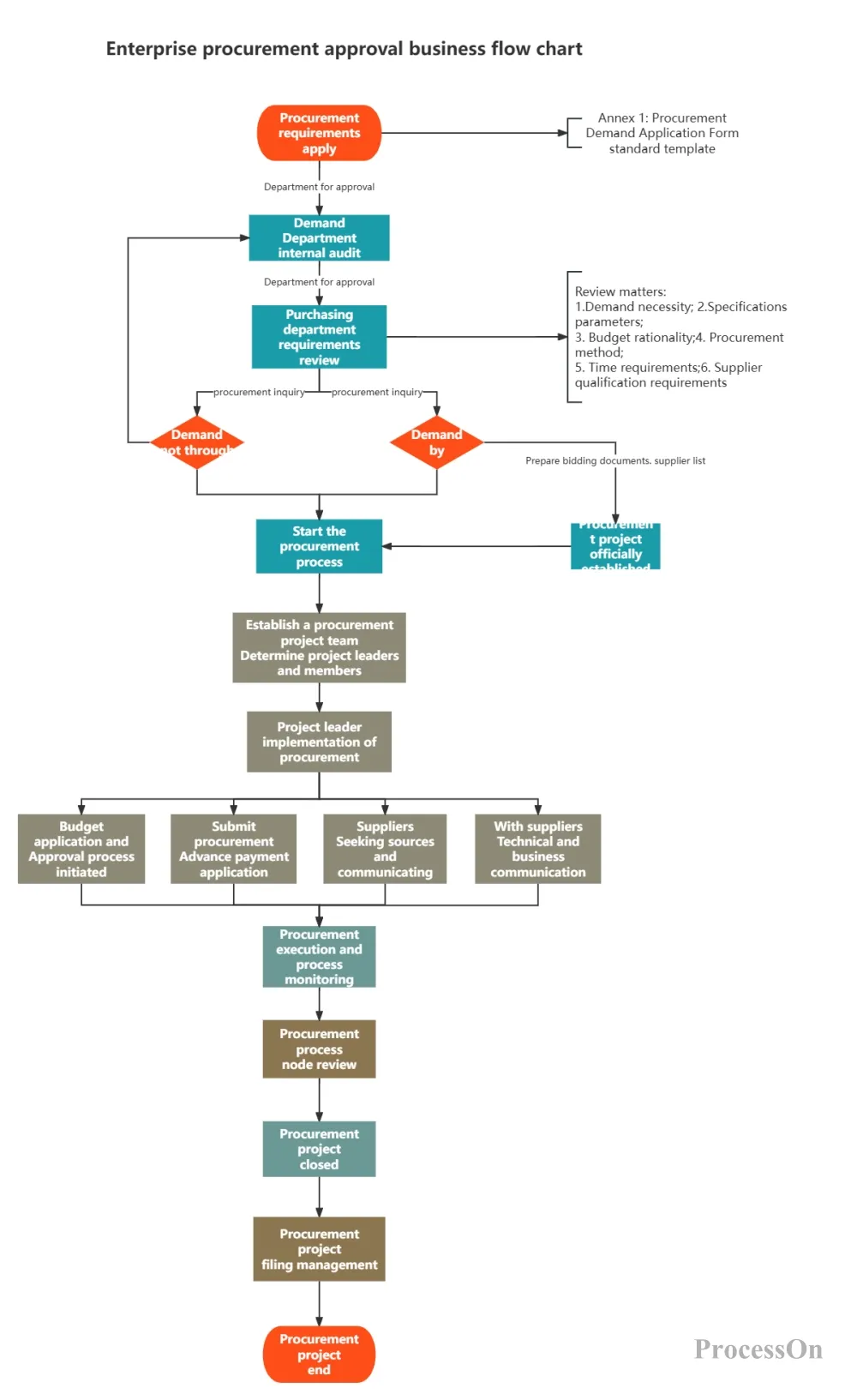
Enterprise Procurement Approval Flowchart
A procurement flowchart is not just an illustration in a policy document, but also the starting point for the digital transformation of enterprise procurement management. Once the process is clear, you can further transform the flowchart into a form system (such as an OA approval workflow), an ERP procurement module, or even integrate it with supplier systems to achieve automatic replenishment.
The foundation of all this is an accurate, standardized, and easy-to-read procurement process diagram. Now, open ProcessOn and start drawing from the procurement process you are most familiar with. Whether it's "office supplies requisition" or "million-dollar equipment tender," a single diagram can help all participants understand and execute effectively.