Process Type
Graphical expression
Mind Type
Structured expression
Note Type
Efficient expression
Treemap
Bracket Diagram

Default Mode





In the world of software development, class diagrams are like blueprints for architecture. Whether you're designing systems, writing technical documentation, or aligning architectural ideas with your team, you can't avoid them. Class diagrams are a type of UML diagram, and their creation requires adherence to design specifications. Traditionally, they are created using UML diagram makers, where you drag and drop graphics to draw the diagram. Currently, using AI to create class diagrams is becoming increasingly common. Today, we'll share how to use ProcessOn AI to generate a complete and accurate UML class diagram in just a few seconds.
A class diagram is the most important type of static structure diagram in UML (Unified Modeling Language). It is used to describe the classes, interfaces, and static relationships between them in a system. You can think of it as an "architectural blueprint"—the house hasn't been built yet, but the blueprints have already clearly drawn the load-bearing walls, doors, windows, and the routes of the pipes.
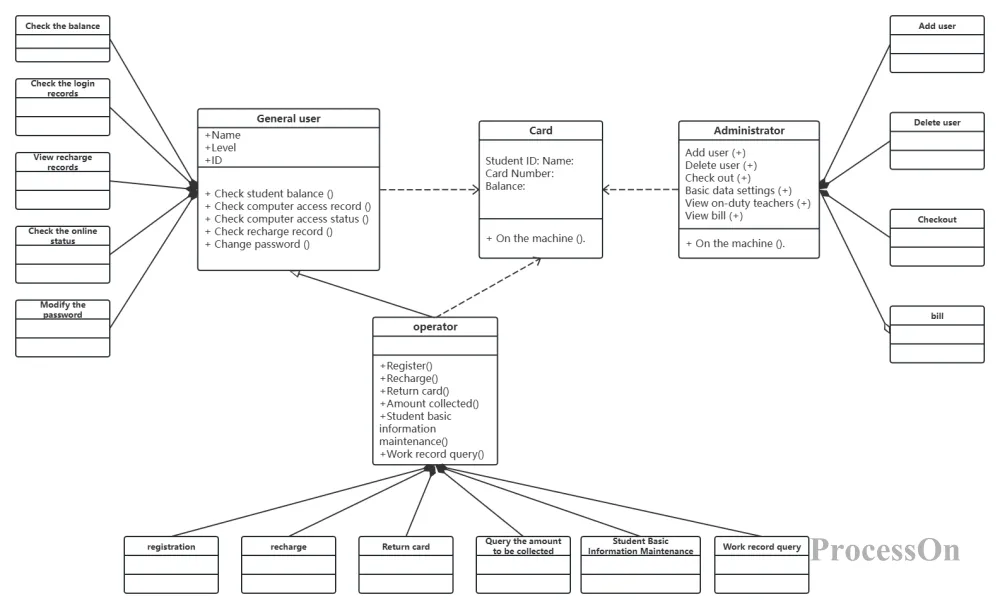
Students surfing the Internet UML class diagram
In a standard class diagram, each class is represented by a rectangle, divided into three sections from top to bottom:
The first section: Class name. If it is an abstract class, the class name will be in italics; if it is an interface, it will usually be marked with <<interface>> above the class name.
The second section: Attributes (member variables). Visibility is indicated by a symbol: + for public, - for private, and # for protected.
The third category: Methods (member functions). These also have a visibility symbol, and the colon is followed by the return type.
Classes are connected by different lines, each line representing a relationship. These six relationships are the core of object-oriented design:
Generalization is inheritance, where a subclass inherits from a parent class. It is represented by a hollow arrow with a solid line, the arrow pointing to the parent class.
Implementation: A class implements an interface. This is represented by a hollow arrow with a dashed line, pointing towards the interface.
Dependency: A temporary usage relationship, such as when a method parameter uses another class. It is represented by an arrow with a dashed line.
Association: A long-term reference relationship, such as one class holding a member variable of another class. Represented by an arrow with a solid line.
Aggregation: The relationship between a whole and its parts, but the parts can exist independently of the whole, such as a car and a tire. It is represented by a hollow rhombus with a solid line, the rhombus next to the whole.
Composition: This also represents a whole-part relationship, but the parts cannot exist independently of the whole. The lifecycle of a part is managed by the whole, such as a company or department. It is represented by a solid diamond with a solid line.
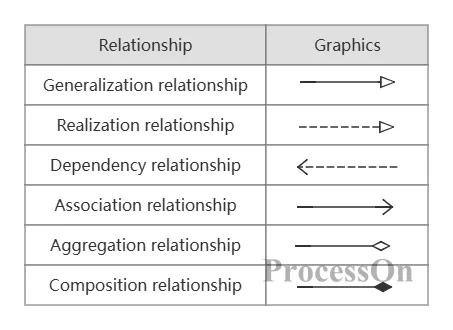
These relationships may seem a bit complicated, but don't worry—when generated by AI, you don't need to remember so many symbols; just clearly state your requirements.
Log in to the ProcessOn website, create a new flowchart, or open any existing canvas. Click the [AI Assistant] button in the upper right corner, and then select [Class Diagram] from the graph type options.
In the input box, write down your design ideas as if you were chatting with a colleague. For example:
"Design a class diagram for the user module of an e-commerce system. There is a base class User with attributes including username, password, and email, and methods such as login and logout. Then there are two subclasses: Customer and Admin. Customer adds a shipping address attribute and an order placement method, while Admin adds permission management methods. There is a one-to-many relationship between User and Order."
After receiving the instruction, the AI will generate a preliminary class diagram within ten seconds. It will draw the inheritance relationship between base classes and subclasses, automatically assign attributes and methods to the corresponding cells, and mark the access control symbols.
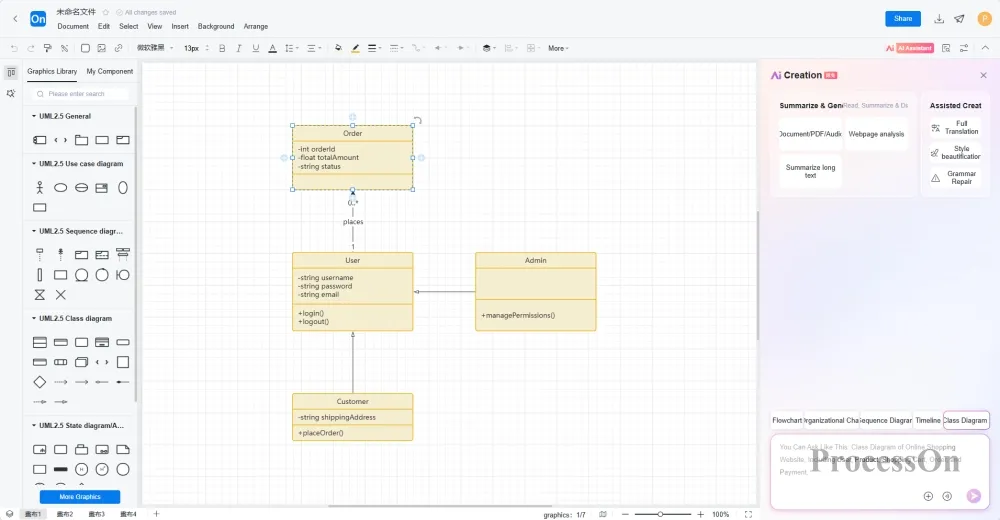
After the AI generates the class diagram, you can manually fine-tune some details in the editor—such as adjusting the position of the boxes to make the layout smoother, or adding a comment to explain the design intent.
Finally, export the document in the format you need: high-resolution PNG for inserting into the document, PDF for printing and archiving, SVG vector graphics for inclusion in the paper, or export an editable Visio format for colleagues to continue revising.
Input requirements: "Design a user-order-product class diagram for an e-commerce system. User has username, password, and email, and can place orders; Order has order number, order time, and total amount, and contains multiple OrderItems; Product has product name, price, and inventory; User and Order have a one-to-many relationship, and Order and Product have a many-to-many relationship through OrderItem."
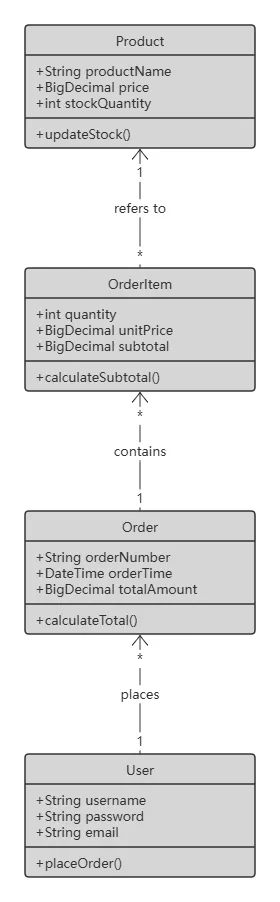
The AI-generated class diagram clearly outlines the relationships between the three classes: User and Order are connected by a line, and Order and Product have a many-to-many relationship through the intermediate class OrderItem. The visibility of attributes and methods is also automatically marked. You can get a professional class diagram that can be used directly in design documents in just a few minutes.
Input requirement: "Give me a class diagram for the Observer design pattern. There is a Subject interface, which contains methods for registering, removing, and notifying observers. The ConcreteSubject class implements this interface, has a state property and a method for getting the state. The Observer interface has an update method. The ConcreteObserver class implements the Observer interface, holds a reference to the ConcreteSubject, and the update method responds based on the subject's state."
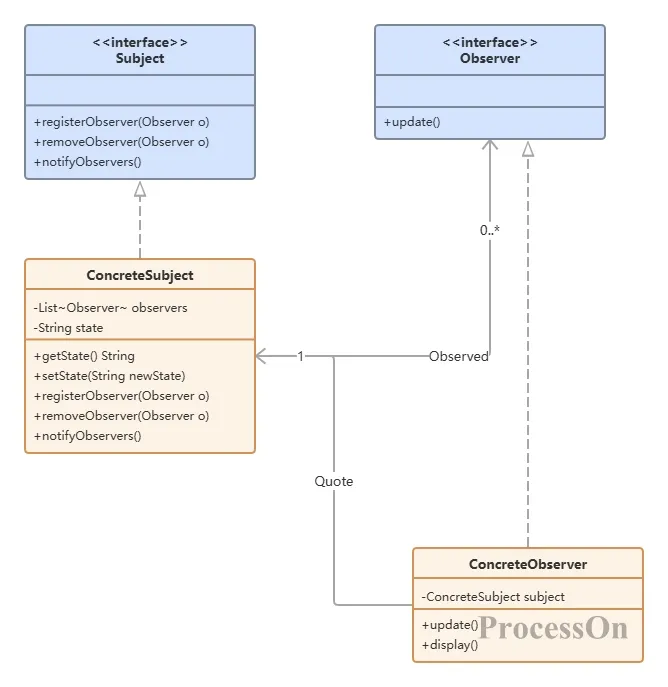
AI will draw the standard design pattern structure: the Subject interface and the ConcreteSubject interface are represented by dashed arrows to indicate their implementation relationship, and ConcreteObserver and ConcreteSubject are connected by association lines, making it clear at a glance.
First, it's a one-stop solution, eliminating the need to switch between tools. Previously, drawing class diagrams involved either manually dragging and dropping using flowchart tools like Visio, or exporting and adjusting code using a code generation tool, resulting in a fragmented workflow. Now, from submitting requirements and generating initial drafts to dialogue optimization and final export, everything is done within a single tool.
Secondly, the AI-generated graphs aren't just for show; they're truly usable professional graphs. Attribute and method permission symbols are automatically added, the lines for the six types of relationships are drawn neatly, and multiplicity markers are also included. They're perfectly usable right out of the box.
Third, conversational optimization, like having a UML expert by your side. After drawing, if you want to change something, just type it to the AI, and you don't have to drag and adjust it bit by bit yourself, saving you time and effort.
Fourth, it's compatible with various formats, so you can use it however you like. PNG, JPG, PDF, SVG, Visio... export options are all available. Whether you're writing documents, giving reports, or sending them to colleagues, there's always a format that suits you.
Fifth, cloud storage allows you to easily access and edit your files. All files are automatically saved to the cloud and synced across multiple devices. If the design changes, simply log in to your account to continue making changes without worrying about losing your files.
Class diagrams are essentially meant to clarify complex designs. In the past, we spent a lot of time worrying about which way the arrows pointed, dotted lines and solid lines, and grid alignment. In fact, we were using the time spent drawing to squeeze out the time spent thinking.
Now with AI, these mechanical tasks can be left to tools. You can truly focus your energy back on the design itself—think clearly about how to divide your classes, how to define relationships, and how to apply patterns, and then let AI help you turn your ideas into a standard, professional, and usable class diagram.
 Following the tutorial to try
Free to use ProcessOn
Following the tutorial to try
Free to use ProcessOn