Process Type
Graphical expression
Mind Type
Structured expression
Note Type
Efficient expression
Treemap
Bracket Diagram

Default Mode





The HR role naturally involves dealing with people. But many people overlook one fact—the essence of HR's work is a series of "graphs".
Consider this: Recruitment is about streamlining the relationships between you, candidates, and business departments, ultimately forming a "process"; training helps employees connect scattered knowledge points into a "map"; organizational structure draws up a "network" of relationships where everyone reports to each other; compensation and performance are about building a "transmission chain" from company strategy to individual goals. At the core of all these tasks is establishing structured connections between complex variables.
Unfortunately, most HR professionals turn these "diagrams" into "documents"—dozens of pages of recruitment policies, dozens of pages of training plans, and densely packed organizational charts. Bosses don't have time to look at them, business departments can't understand them, and the execution team can't remember them. When you use words to describe something that should be visualized, the loss of information is enormous.
Truly high-level HR professionals have long since mastered the art of using charts for management. Flowcharts transform recruitment from a process of constant reminders to one of automated workflows; mind maps transform training from a collection of courses into a clear development path; and organizational charts make company hierarchy transparent and easily understood. Charts don't add to HR's workload; rather, they liberate them from tedious communication and explanation.
This article systematically introduces how to use the ProcessOn tool to make HR management visible, manageable, and traceable, starting from three core scenarios: HR recruitment, training, and organizational management.
The human resources department is one of the core hubs of a company's operations . From talent recruitment to onboarding training, from performance appraisal to offboarding management, HR's daily work involves a large number of standardized processes. If these processes are only described in writing or communicated verbally, it is not only easy to cause misunderstandings, but also reduces efficiency and increases compliance risks .
A good workflow diagram can bring four core values:
Standardized operation: Every step, every step, and every responsible person is clearly visible.
Visual communication: enabling business departments and management to quickly understand the logic of HR work.
Continuous optimization: Review processes using flowcharts to identify bottlenecks and redundant steps.
Compliance documentation: Important processes (such as disciplinary actions and resignations) are documented and traceable.
ProcessOn, a professional online diagramming and collaboration platform, offers over twenty types of professional diagrams, including flowcharts, organizational charts, swimlane diagrams, BPMN, and mind maps, and supports multi-person online collaboration and AI-powered intelligent generation . HR professionals can visualize and manage the entire employee lifecycle—recruitment processes, employee onboarding processes, training processes, probationary period completion processes, leave approval processes, and departure handover processes—through flowcharts, swimlane diagrams, or organizational charts .
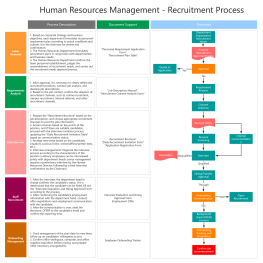
Recruitment is the "face" of HR, involving many steps such as confirming needs, posting to relevant channels, screening resumes, conducting interviews, conducting background checks, and issuing offers . If only described in words, a newly hired HR specialist might need one or two months to understand the complete recruitment process; however, a single diagram can explain it clearly in 5 minutes .
The recruitment process involves multiple roles, including the hiring department, HR, interviewers, and candidates. The responsibilities and handover points at each stage need to be clearly defined . Swimlane diagrams (cross-functional process diagrams) are the perfect tool for solving this problem.
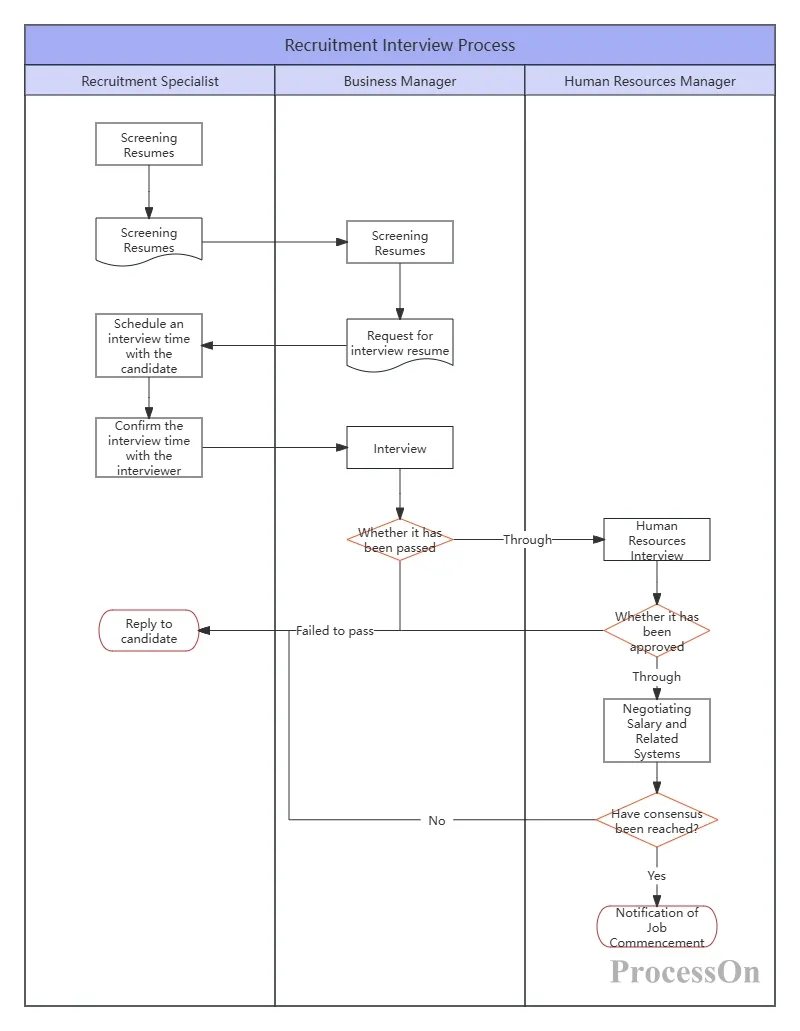
Drawing method: Horizontally, multiple swimlanes are set up, corresponding to roles such as "Hiring Department," "HR," "Interviewer," and "Candidate." Vertically, the recruitment steps are arranged chronologically: requirement confirmation, job posting, resume screening, initial interview, second interview, offer approval, and onboarding . Arrows are used to indicate the handover relationships between each step, and diamond boxes are used to mark decision points (e.g., "Did the interview go well?").
You can find ready-made swimlane diagram templates by searching "recruitment process" in the ProcessOn template community. These templates can be reused with one click, and modifications can be made more efficiently.
Training planning is more difficult than recruitment because its output is not as easily quantifiable as "how many people were recruited ." Many HR professionals write training plans with detailed content and complete course lists, but after reading them, the boss still doesn't know "what major things need to be accomplished in training this year . "
Mind mapping is a powerful tool for solving this problem.
With "2026 HR Work Plan" as the central theme, the first level of branches consists of major modules: recruitment and staffing, training and development, performance management, compensation and benefits, employee relations, and organizational development. Each module is further broken down into specific projects and key tasks.
Example of breaking down a training module: Training planning → Needs assessment → Course development → Implementation → Effectiveness evaluation → Technical support → Continuous improvement. Each branch is further broken down into specific action items, responsible persons, and timelines.
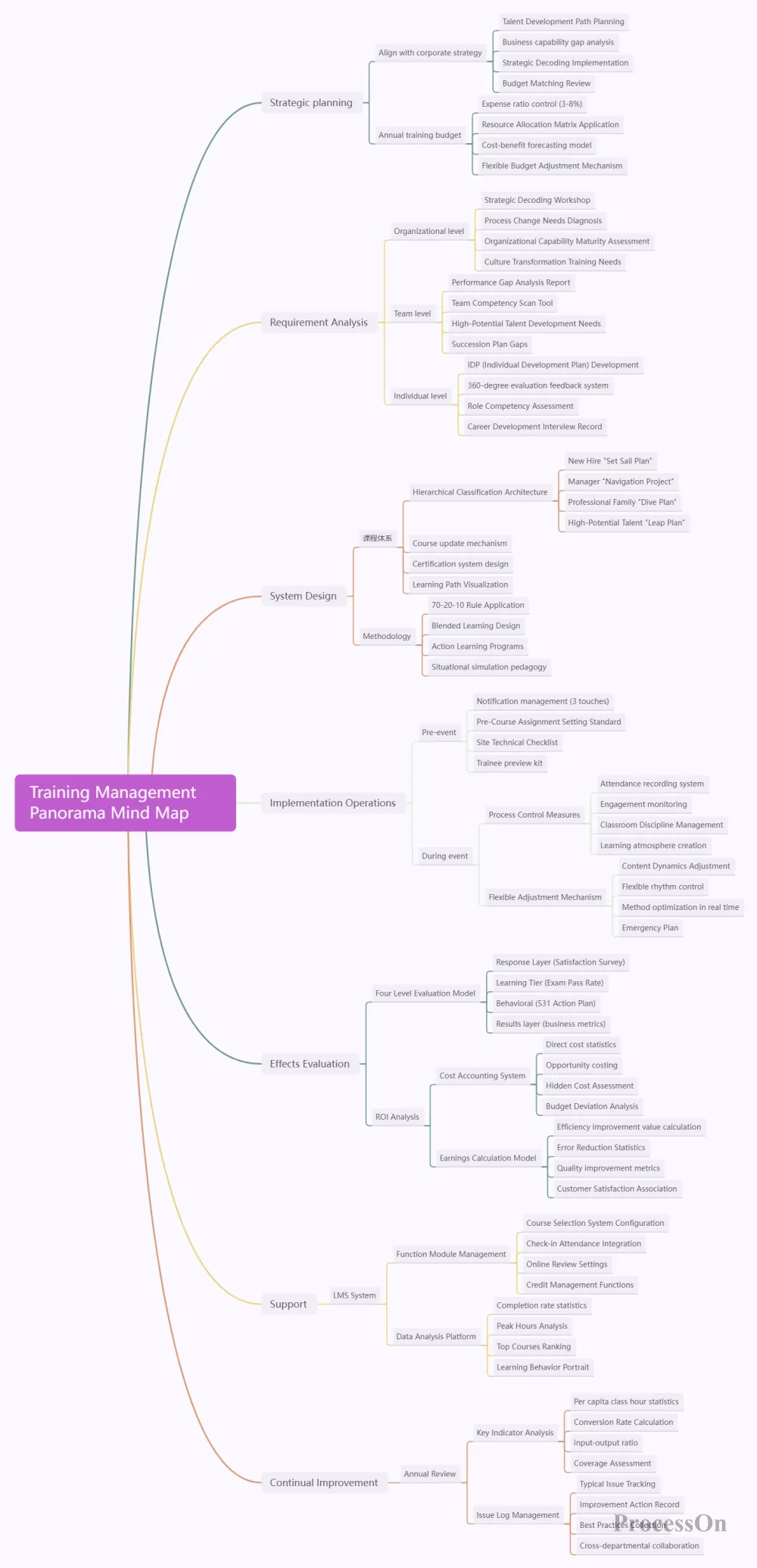
ProcessOn's mind maps support one-click generation; simply enter keywords to automatically break them down into multi-layered structures . The template community offers ready-made training mind map templates such as "Training System Design" and "Training Management Planning."
From training needs analysis to effectiveness evaluation, the complete training management process involves multiple stages and roles, including needs assessment and training plan development .
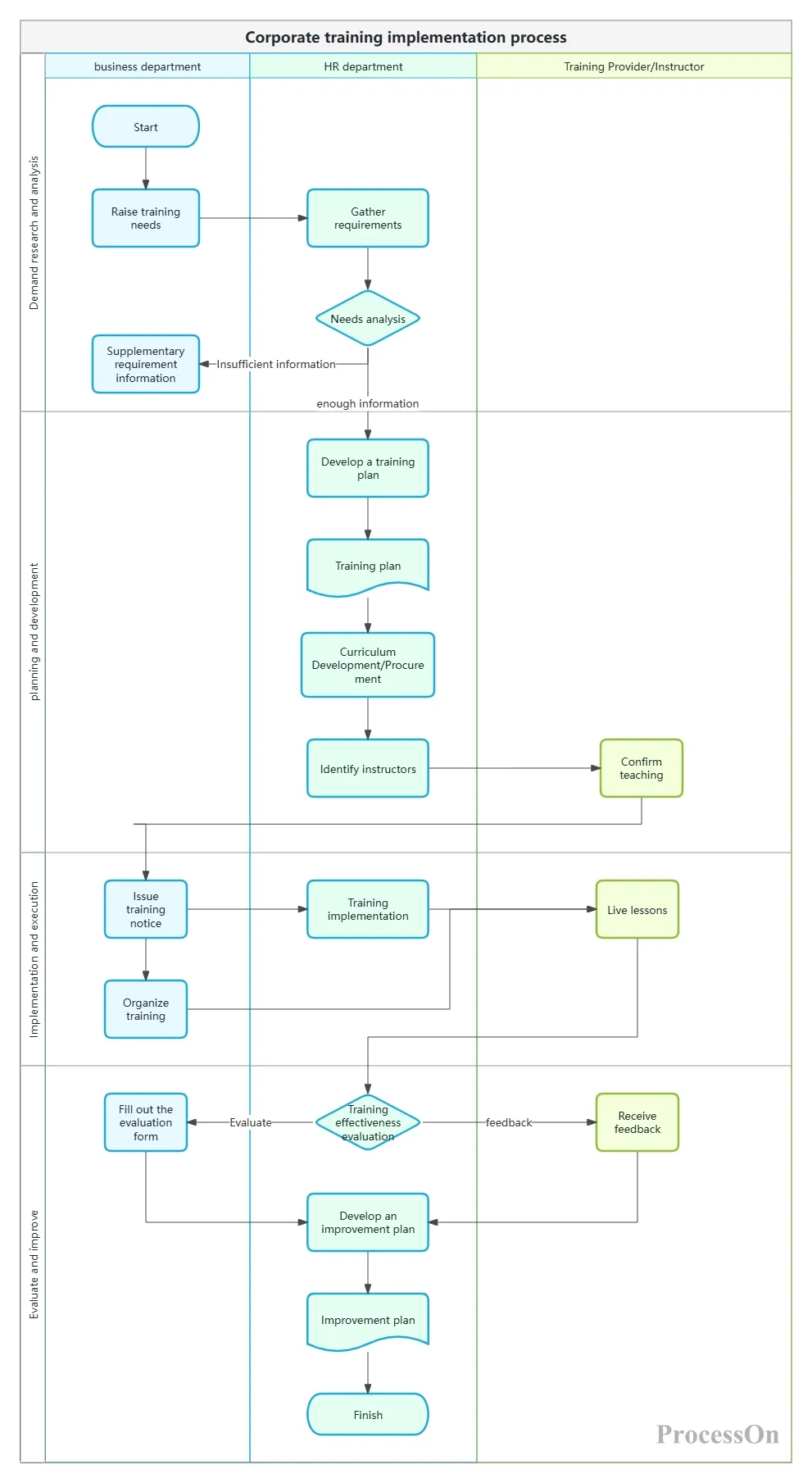
Use swimlane diagrams to distinguish the responsibilities of different roles such as HR, training instructors, employees, and management, and use different colors to mark key approval and evaluation points.
Organizational charts are one of the most frequently used and important charts for HR professionals. For company owners and HR, organizational charts are a staple – they are needed when the company is doing well, when the organizational structure needs to be upgraded and adjusted, and when there is employee turnover.
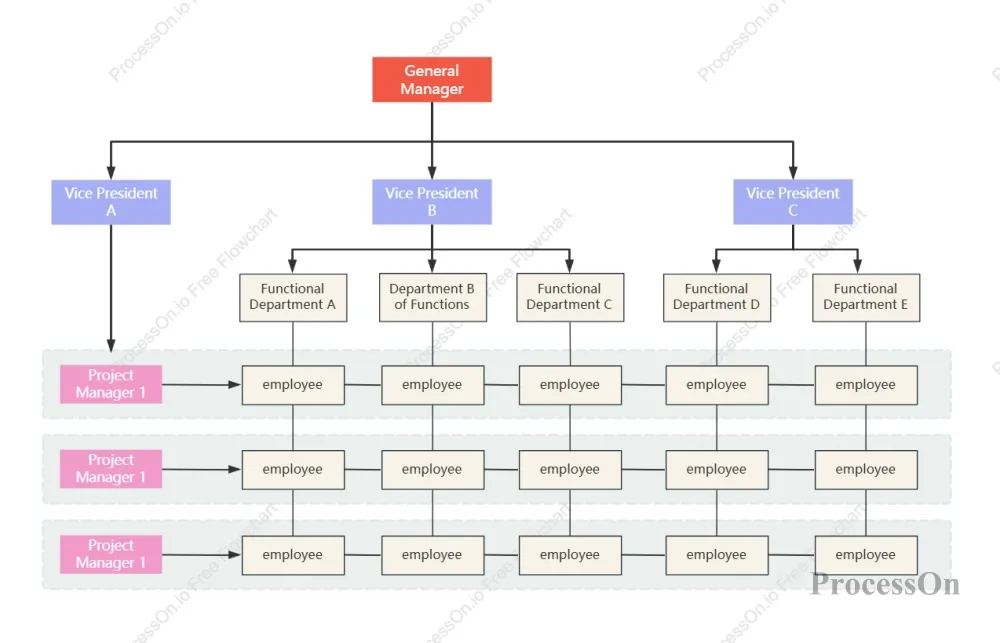
ProcessOn supports online organization chart creation and offers a vast library of templates and examples for easy replication. Simply enter the job titles or departments of the personnel within the organization to quickly generate a professional organization chart.
Functional organizational chart: This is the most common type, dividing departments according to their functions, such as sales, marketing, and human resources. Each functional department has clearly defined responsibilities and reports to its immediate supervisor.
Flat organizational structure: fewer layers and wider span of control, suitable for startups and agile teams.
Network organizational chart: Suitable for complex organizational structures that span regions and companies.
Clearly define the hierarchy: start from the CEO or top management and work downwards layer by layer—senior management → middle management → frontline employees;
Label job responsibilities: Label each node with the job title and key responsibilities;
Clear reporting relationships: Use lines to clearly indicate the reporting relationships between superiors and subordinates;
Distinguish departmental boundaries: Use different colors or areas to distinguish different departments.
ProcessOn offers a rich collection of organizational chart templates—from basic corporate organizational charts to e-commerce company organizational charts, covering businesses of all sizes and types. You can search for "organizational chart" in the template community to find a template you like and copy it directly. A clear personnel structure document should include elements such as an organizational chart, job descriptions, responsibility allocation tables, and management hierarchy charts to ensure that all employees clearly understand their responsibilities, authority, and work objectives.
In addition to recruitment, training, and organizational structure, HR also needs to manage the entire lifecycle of employees from onboarding to offboarding .
The onboarding process directly impacts a new employee's first impression and is also related to compliance matters such as contracts, social security, and account information .
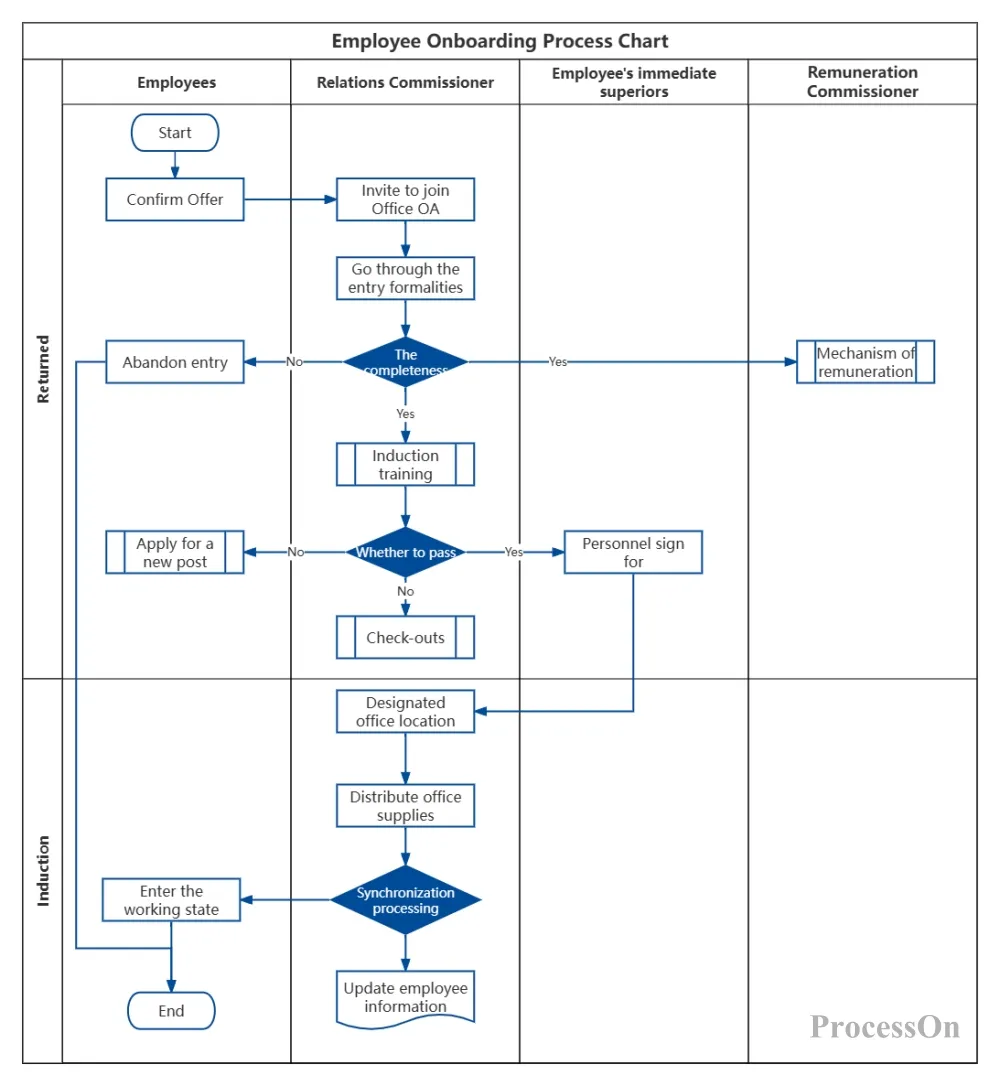
Conversion to permanent employment process: Employee submits conversion application → Direct supervisor evaluates → HR reviews → Conversion approval → Salary adjustment
Leave approval process: Employee submits leave application → Immediate supervisor approves → HR records filing → Attendance record update
Job transfer process: Job transfer application → Approval by original department → Approval by new department → HR filing → Salary/authority adjustment
Resignation handover process: Employee submits resignation application → Exit interview → Work handover → Asset recovery → Salary settlement → Document archiving
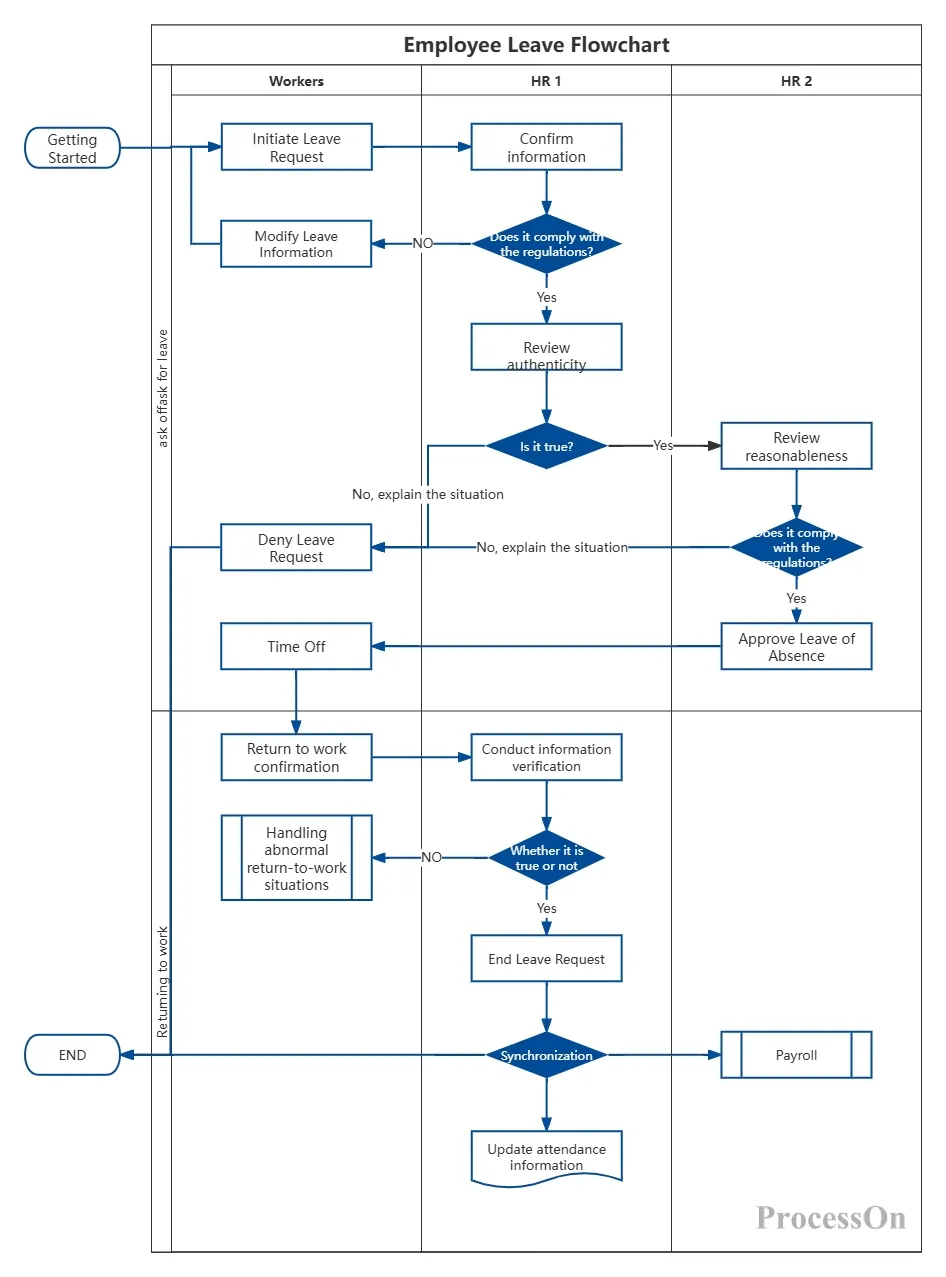
All of the above processes can be created as standardized flowcharts using ProcessOn, allowing employees to quickly understand the procedures and facilitating continuous optimization of management practices by the company . The ProcessOn template community offers tens of thousands of template resources; simply search for keywords such as "onboarding process" or "offboarding process" to find ready-made professional templates.
ProcessOn, as a professional online charting and collaboration platform, provides HR with a one-stop charting solution:
A vast HR template library: Search the template community for keywords such as "recruitment process", "onboarding flowchart", "departure process", "organizational chart", and "HR work planning mind map" to find ready-made professional templates that can be reused with one click;
Full coverage of multiple chart types: Flowcharts, swimlane diagrams, mind maps, organizational charts, Gantt charts, funnel charts—ProcessOn supports all the chart types that HR needs;
AI intelligent generation: Enter keywords to generate mind maps, flowcharts, etc. with one click, greatly reducing the threshold for drawing;
Team collaboration and version management: Supports real-time online collaboration among multiple users, allowing the HR team to jointly maintain process specifications, with each modification automatically saving historical versions;
Cloud storage and multi-device synchronization: All files are automatically stored in the cloud, and can be viewed and edited anytime on computers, mobile phones, and tablets.
Q1: Which types of charts should HR professionals prioritize mastering?
A: Based on the high-frequency scenarios in HR work, it is recommended to prioritize mastering the following charts: flowcharts/swimlane diagrams (standardized processes such as recruitment, onboarding, and offboarding), mind maps (strategic breakdowns such as training plans and annual work plans) , organizational charts (clarifying company hierarchy and reporting relationships), Gantt charts (recruitment scheduling and project progress control), and funnel charts (recruitment conversion effectiveness analysis). These five charts cover the complete work chain of HR from "daily execution" to "strategic planning."
Q2: What is the difference between a swimlane diagram and a regular flowchart?
A: A standard flowchart shows the sequence of steps for "how to do things," suitable for single roles or simple processes. A swimlane diagram adds a "role dimension" to the flowchart—it's divided horizontally or vertically into multiple swimlanes, each corresponding to a role (such as HR, hiring department, candidate), with each role's operational steps drawn within their corresponding swimlane . The biggest advantage of a swimlane diagram is that responsibilities are immediately clear—who should do what, and when, without any ambiguity .
Q3: How to create an effective recruitment funnel chart?
A: The key to a recruitment funnel chart is accurate data and regular tracking. Recommendations: ① The stages should align with your company's actual recruitment process (e.g., "Job exposure → Application → Initial screening → Interview → Offer → Onboarding"); ② Data for each stage must be accurate and verifiable (don't fill in based on intuition); ③ Update weekly/monthly to compare trends; ④ If an abnormal drop in conversion rate is observed at a certain stage, immediately conduct an in-depth analysis of the reasons and take action .
Q4: How often should organizational charts be updated?
A: Organizational charts are "living documents"—they should be updated immediately after each organizational change. Common update triggers include: the establishment of new departments, departmental mergers/splitting, changes in key personnel, and adjustments to reporting relationships. It is recommended that HR assign a dedicated person to maintain the organizational chart, and that each update be shared with the entire team. ProcessOn's cloud storage and version control features ensure that the organizational chart is always up-to-date, so that all team members see the same chart.
Q5: Can the HR templates on ProcessOn be used directly?
A: Yes. All templates in the ProcessOn template community support "one-click cloning," after which all graphics, text, and connections can be freely edited and modified. You can adjust the content according to your company's actual situation—modify process steps, replace job titles, adjust organizational levels—and generate a professional enterprise-level HR management chart in just a few minutes.
Q6: What if I can't draw? Is there a quick way to learn?
A: Three methods: ① Use templates—ProcessOn's template community has a large number of ready-made templates for HR scenarios (recruitment processes, onboarding processes, organizational charts, etc.). Find a suitable one and clone and modify it directly; ② Use AI to generate—ProcessOn supports one-click generation of mind maps and flowcharts using AI. Simply enter keywords to generate them automatically; ③ Start simple and gradually increase the complexity—first draw the simplest version (such as a recruitment flowchart that only lists the core steps), and then gradually add details as you use it. The value of a chart lies in "using it," not in "drawing it perfectly."