v1.0.82026-07-29
ProcessOn launches LaTex formula editor
· Launch of LaTeX Formula Editor
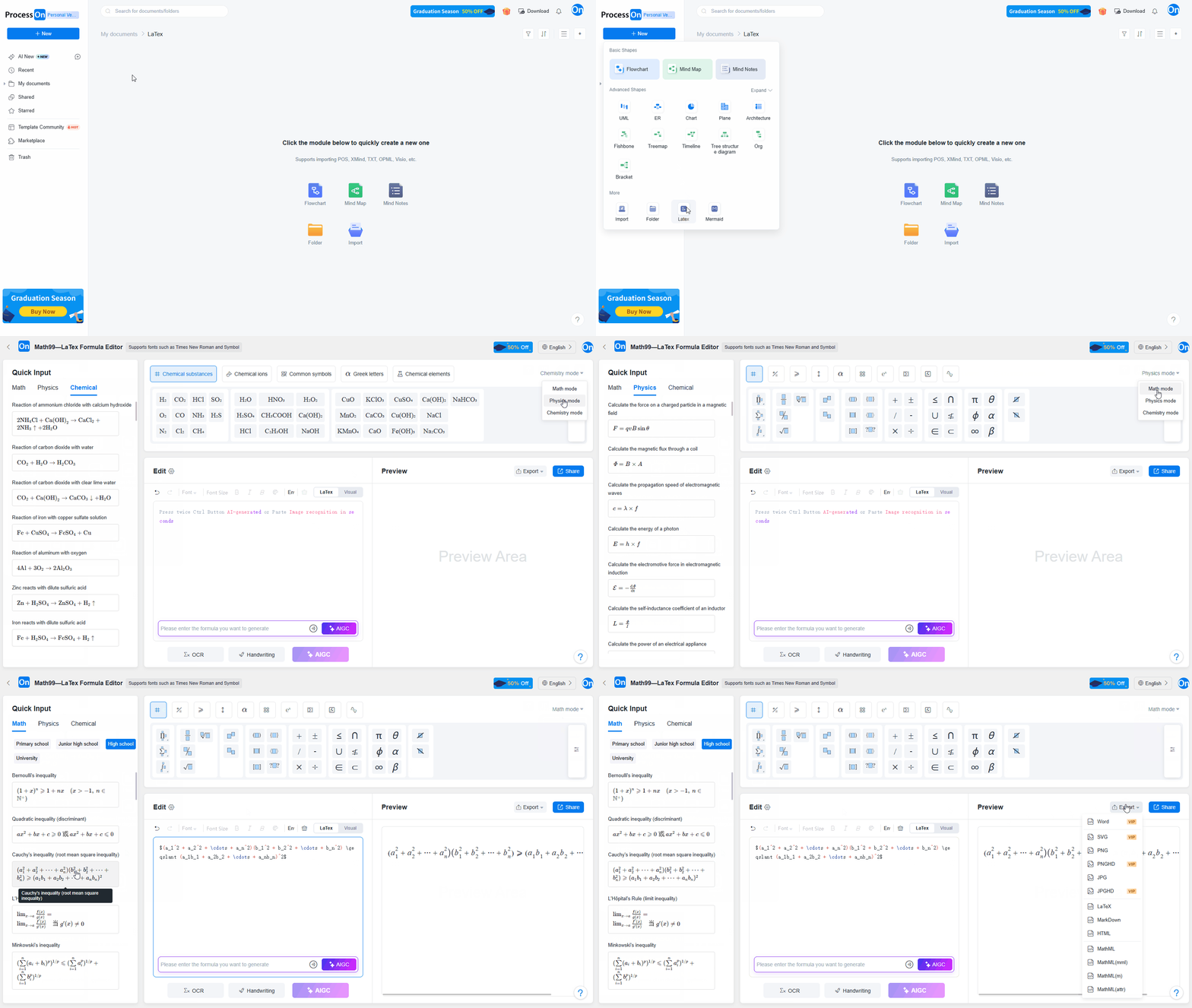
The LaTeX formula editor supports the input of mathematical, physical, and chemical formulas, as well as OCR image recognition, handwritten formula recognition, and AI-generated formulas. Once edited, formulas can be exported as image formats (such as SVG, PNG, and JPG) or code formats (such as HTML and MathML).
· Addition of Matrix Structure to Mind Maps
A matrix structure has been added to mind maps, allowing content to be displayed in a 2D grid format where the vertical and horizontal axes represent different dimensions. This matrix structure can be combined with other mind map layouts—such as logic charts, tree diagrams, and timelines—within a single diagram, meeting the need for multi-dimensional representation in complex projects.
· More Color Schemes for Mind Maps
New professional color schemes have been introduced to suit the visual requirements of various scenarios, such as academic and business settings. All color schemes support one-click global application, ensuring that mind maps present the most appropriate visual style for any occasion.
v1.0.72026-06-25
ProcessOn Update Log | 2026-06-25
· Flowcharts now support text annotations on graphs
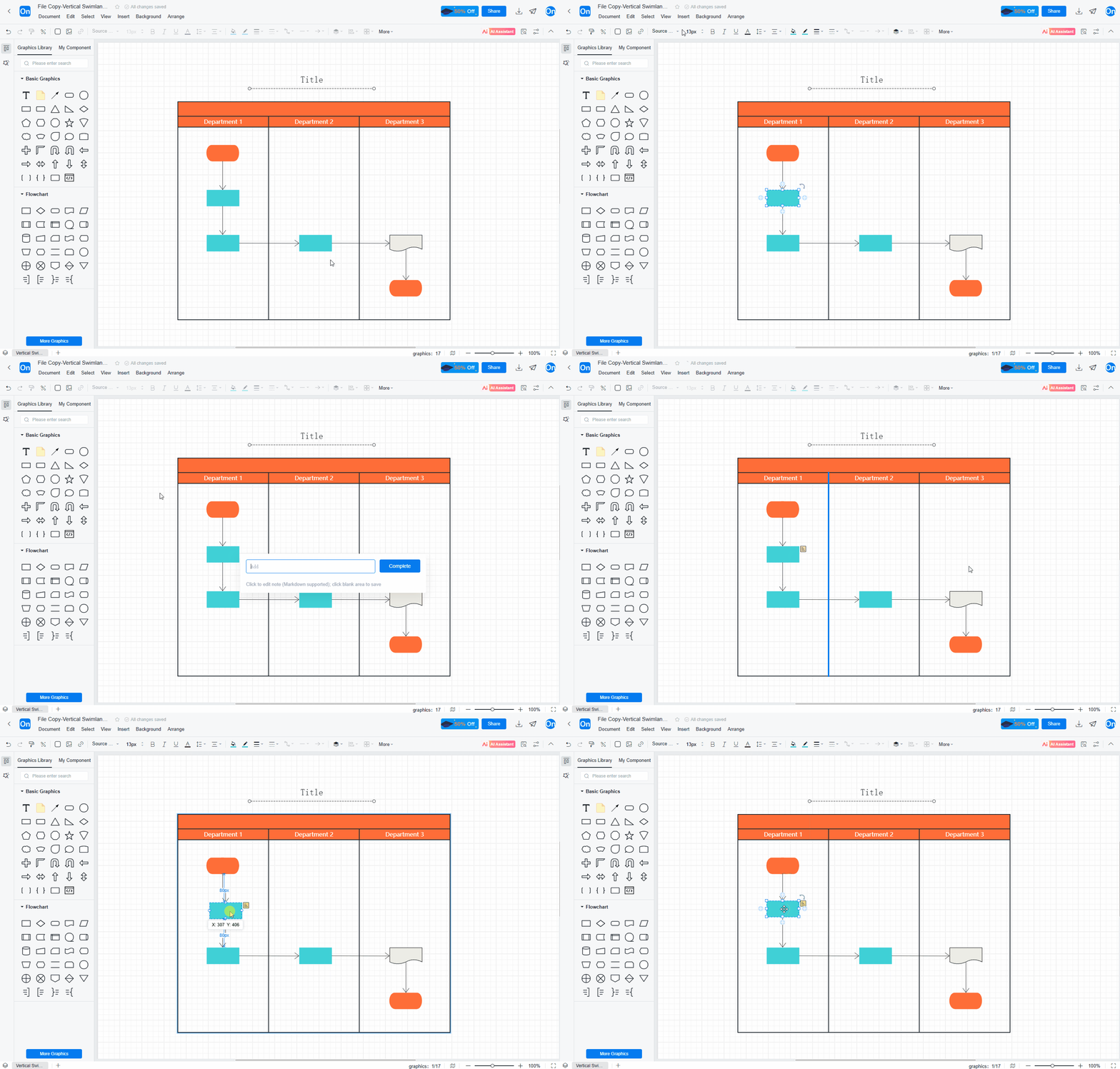
You can add independent text annotations to any graph in your flowchart. The annotations appear as floating tags next to the graph, without affecting the main graph layout. This is suitable for supplementary explanations, highlighting important points, or recording to-do items, making information more complete.
· Flowcharts now support exporting portions of graphs from a single file
Select one or more graphs, right-click and select "Copy/Export Graph" to directly generate an image of the selected content and copy it for easy pasting into PowerPoint, Word, or chat windows. No need to export the entire graph; you can quickly share flowchart segments or reuse parts of the design.
· Flowcharts now support watermarking
You can add text watermarks to your flowcharts, suitable for corporate documents, internal policy releases, and external sharing. Add statuses such as "Internal Document," "Confidential," and "Creator's Name" to protect intellectual property and enhance the professionalism and sense of ownership of the document.
v1.0.62026-06-11
ProcessOn Update Log | 2026-06-11
· Add Node Comments to Mind Maps: @Contacts or Other Documents
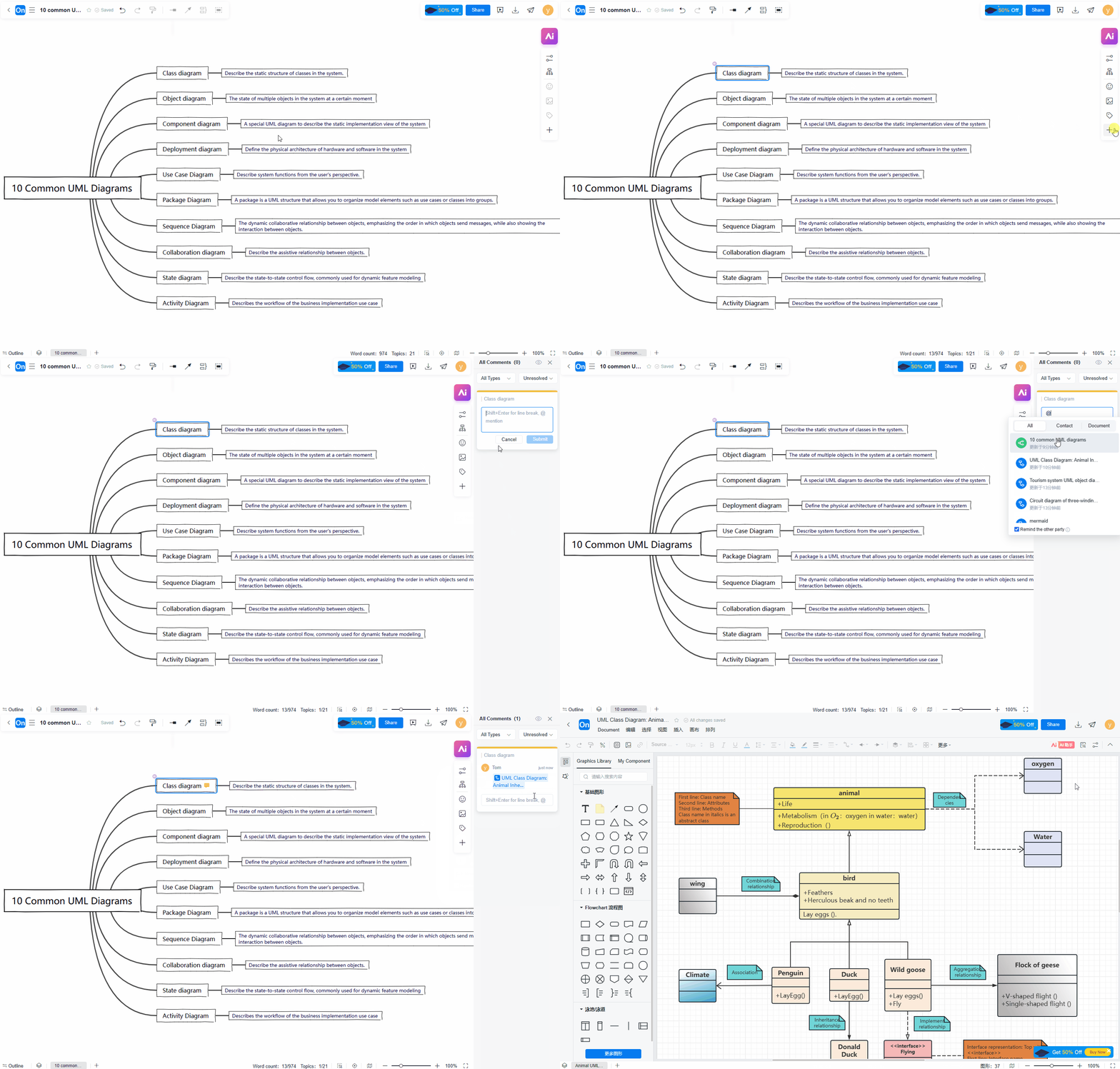
Team collaboration is upgraded. You can add comments to any node by typing the @ symbol to mention colleagues within your organization; they will receive a real-time notification. It also supports @referencing other documents, allowing one-click navigation to related content.
Suitable for project debriefing, solution review, and knowledge consolidation. Discussions revolve around specific nodes, with all opinions reflected on the map.
· Insert Code Blocks into Mind Maps
You can directly embed code blocks into any node of the mind map, with syntax highlighting supported. Whether it's programming examples, configuration snippets, or database queries, formatting is clearly preserved.
Suitable for technical solution design, algorithm analysis, and teaching demonstrations, making knowledge structures more complete without the need for screenshots or external links.
· Select All Siblings in Mind Maps
A new "Select Sibling Branches" shortcut allows you to select all sibling nodes of the current topic with a single click. Batch style adjustments, repositioning, deletion, and addition of subtopics are supported, significantly improving layout efficiency.
v1.0.52026-05-28
ProcessOn Update Log | 2026-05-28
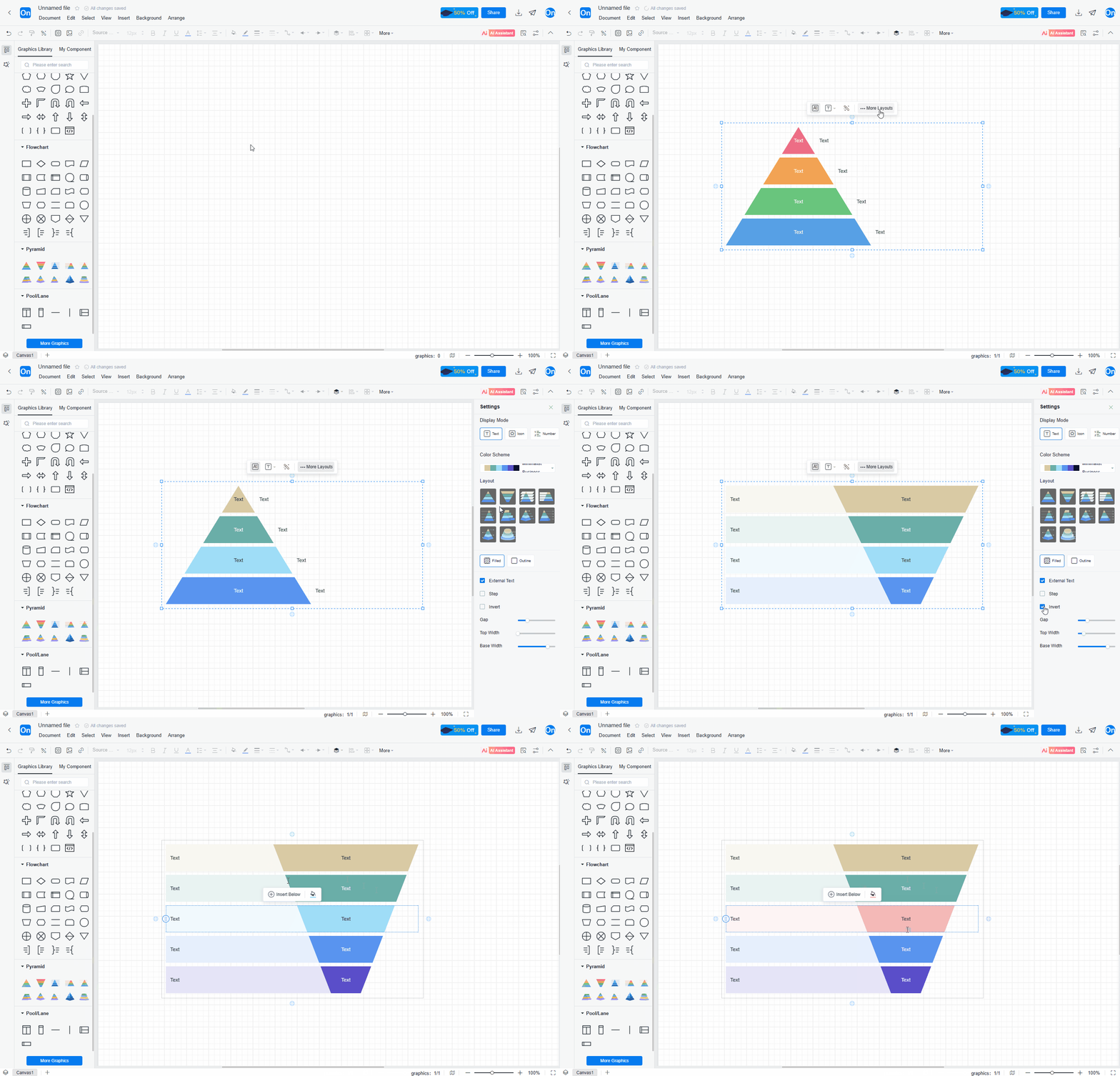
· Pyramid Chart Creation Supported Within Flowcharts
You can now directly insert pyramid charts into flowcharts to display hierarchical structures, priority distributions, or funnel transformations. Multiple layouts are available, supporting customization of the number of levels, text, and color for each level.
· Keyword Find and Replace Within Documents
A new full-text find and replace function allows for quick searching of specified keywords within the current document and one-click replacement with new content. Ideal for batch editing of terms, labels, or names in charts; when product names or field definitions change, there's no need to manually modify each node individually, saving significant repetitive work.
· Adjustable Corner Radius for Graphic Borders Within Flowcharts
The corner radius of rectangle, rhombus, trapezoid, and other graphic borders can now be adjusted, allowing you to freely set the corner radius. Suitable for users seeking a refined visual style, this eliminates harsh right-angle edges in charts, presenting a softer, more modern look.
v1.0.42026-05-12
ProcessOn Update Log | 2026-05-12
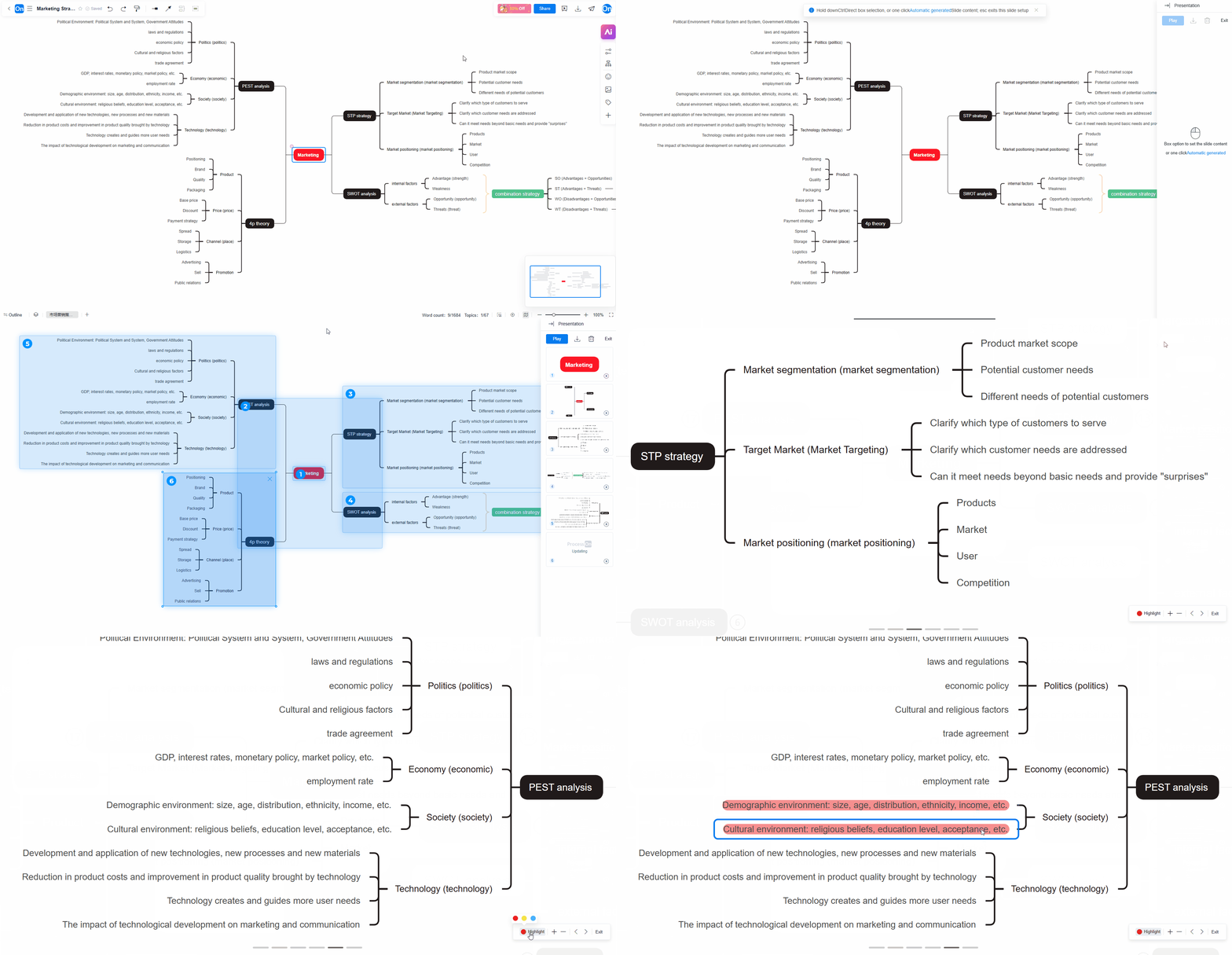
· Mind Maps Support Slideshow Presentations
You can create slideshows from your mind maps, freely setting the display order of nodes. In presentation mode, the system will expand each branch node level by level, automatically generating a smooth presentation flow. No need to create a separate PowerPoint presentation; simply present directly on the mind map, maintaining the continuity of your thought process. You can also annotate key points during the presentation. Suitable for project reports, teaching demonstrations, and project reviews.
· Mind Map Node Borders Support Title Settings
Add independent title bars to the borders of mind map nodes. You can set different title text for each border, with the title bar displayed separately from the node content area. Use titles to clearly express the theme of the group, making the hierarchical relationship more explicit.
· Mind Maps Support More Node Connection Styles
The connecting lines between nodes are no longer limited to a single style. Support for various styles such as curves, polylines, and right angles, with customizable line width, color, and arrow type, suitable for complex mind maps and free layouts, making visual expression richer.
· Change Text Direction Within Mind Map Nodes
Text within nodes is no longer limited to horizontal arrangement. You can now set the text direction to vertical. This is suitable for narrow, elongated nodes or special layouts, such as using vertical text in vertical timeline nodes, saving horizontal space and increasing information density. This setting can be applied to selected nodes independently without affecting the overall layout.
v1.0.32026-04-27
ProcessOn Update Log | April 27, 2026
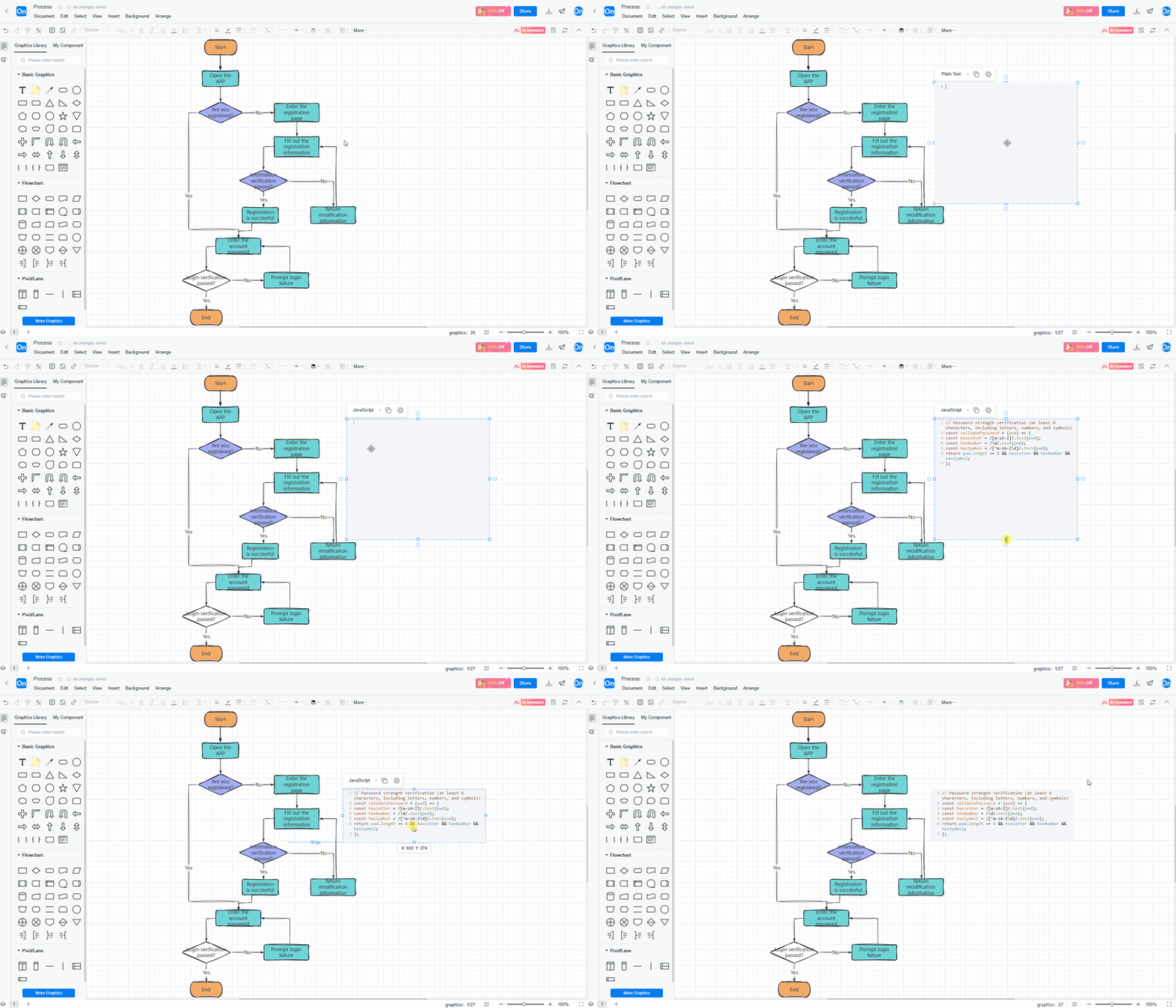
· Code Block Insertion Support within Flowcharts
You can directly embed code blocks within nodes of flowcharts, architecture diagrams, and other diagrams for more rigorous logic. Supports common programming languages (Java, Python, JavaScript, SQL, etc.). Code blocks within nodes can be scaled independently, maintaining a clean layout.
· Flowchart Sketch Style Settings
You can switch the "Sketch Style" for shapes and connections in your flowcharts with a single click. All node borders and connections will display a natural sketch-like jitter effect, moving away from rigid, perfectly straight lines. Supports switching between standard and standard styles at any time to meet the visual needs of different scenarios.
· Support for Multiple ER Diagram Relationship Symbols
Database design has never been so flexible. Currently, ER diagrams support mainstream relationship symbol types such as crow's foot, Chen's symbol, and Bachman symbol, meeting the design specifications and teaching needs of different teams.
· Creating Multiple Canvases within a Single File
A single file is no longer limited to one diagram. Now you can create multiple independent canvases (Tabs) within the same file, each with its own chart type, layers, and page settings. You can put complex projects in one file and switch between them without having to open multiple files.
v1.0.22026-04-08
ProcessOn Update Log | 2026-04-08
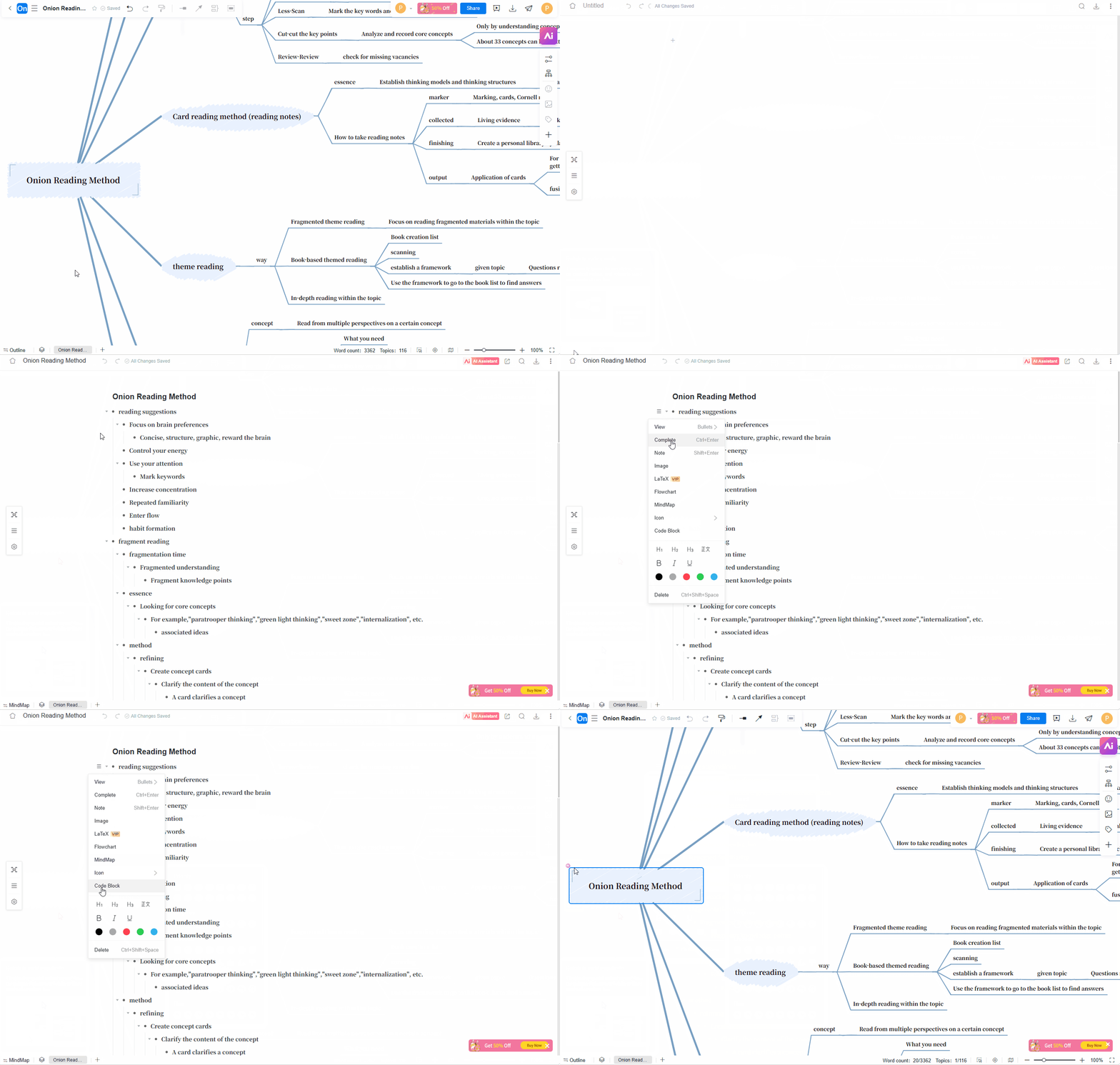
· Mind Map ↔ Outline Mode: One-Click Switch
Add outline view mode. Click the 'Outline Mode' button to seamlessly switch between the classic 'Mind Map' layout and the 'Hierarchical Outline' text view. In outline mode, text can be quickly edited, hierarchy can be adjusted, and nodes can be moved in batches; Switch back to the navigation mode to obtain a global visualization perspective, and the two modes are synchronized in real-time.
· Markdown Mind Map Creation
You can directly use Markdown syntax to create mind maps.
. Simply input/paste code in the mind map maker, or import Markdown format files, and the system will automatically convert them into structured mind map nodes, suitable for users who are accustomed to pure text writing.
· Multiple Structures Supported within a Single Mind Map
A mind map can contain multiple independent root nodes, and each root node supports setting its own independent structure.
. You can set different nodes as basic mind maps, tree diagrams, fishbone diagrams, tables, matrices, and other structures within a mind map to display different types of content.
· Use Mind Maps for Task Management
Directly add task status (To Do, In Progress, Completed), due date, priority, and responsible party to nodes. Task nodes can be viewed in a "Task Kanban" view. Turn mind maps into your project management tool: no more copying and pasting between mind maps and to-do lists. Plan your ideas while tracking progress.
v1.0.12026-03-23
ProcessOn Update Log | March 2026
·Mermaid Flowchart Creation
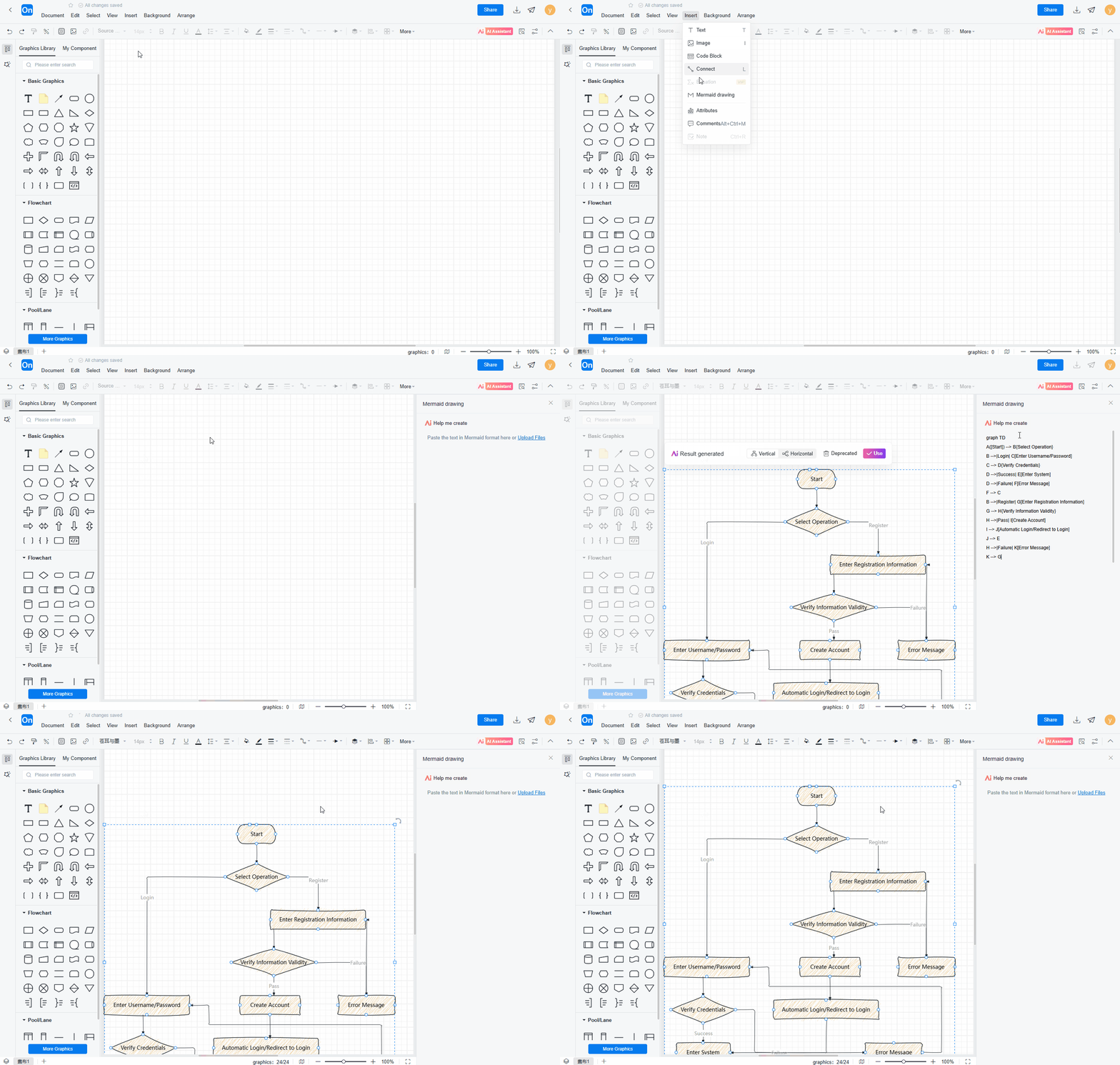
You can quickly generate a flowchart using Mermaid syntax. Simply enter code in the flowchart maker or import a Mermaid file to render it in real-time as a visual graphic.
· Optimized Swimlane Diagrams for a Better Experience
The usage experience of the swimlane diagram has been comprehensively updated. You can freely adjust the title, swimming pool, stage text direction, and background color of the swimlane diagram. You can also freeze the title when there is too much content in the swimlane diagram to avoid repeatedly scrolling through the page to view the title content.
· Custom Graphics and Icons Supported in Flowcharts
Create categories in my component, and import local images and icons under different categories, supporting multiple formats such as png, jpg, svg, vssx, etc.
· Commenting Support for Flowchart Elements
Team collaboration has become more efficient.Comments and feedback can be added at any node in the flowchart. Real time notification of comment content, team members can reply to discussions, all communication is settled on corresponding elements, and modification suggestions are clear at a glance.