Process Type
Graphical expression
Mind Type
Structured expression
Note Type
Efficient expression
Treemap
Bracket Diagram

Default Mode





Many students and teachers face this dilemma: they read textbooks repeatedly and fill pages with notes. Yet when reviewing or solving problems, knowledge points remain jumbled and fragmented. They often learn much but retain little. We spend enormous time copying and organizing texts with scant results. The core issue is not a lack of effort, but the way we summarize knowledge. A truly effective summary is not mechanical excerpting of source material, but the reconstruction of connections between pieces of knowledge. This article helps you break free from inefficient note‑taking pitfalls, grasp the underlying logic of knowledge summarization, and master actionable visual summarization methods. You will be able to map out an entire chapter in one diagram and truly embed scattered content in your memory.
Almost all the frustration of "learning a lot but remembering nothing" comes not from a lack of effort, but from taking in information the wrong way.
Textbooks, slides, classroom recordings, and online lecture videos are all essentially linear structures — they must proceed page by page, minute by minute. But the way the human brain stores knowledge is a networked structure — concepts are connected through associations, hierarchies, and cause-and-effect relationships.
This creates a classic contradiction:
What educational knowledge summarization must do is perform a "structural translation" among these three.
This also explains why so many people summarize inefficiently: copying textbook sentences verbatim, shrinking slides into smaller slides, or tidying notes — the form changes, but the structure does not. Linear information remains linear information; it never enters your knowledge network.
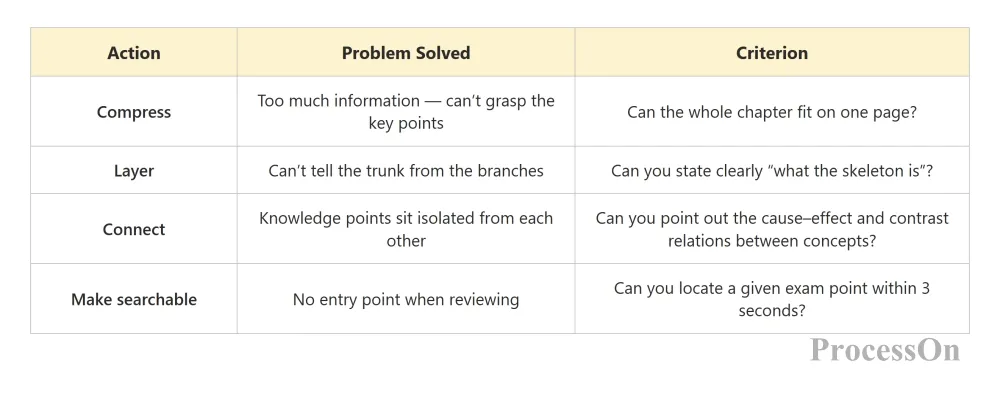
Truly effective knowledge summarization must accomplish at least four things:
Before choosing a tool, first understand the differences between the four forms of summarization.
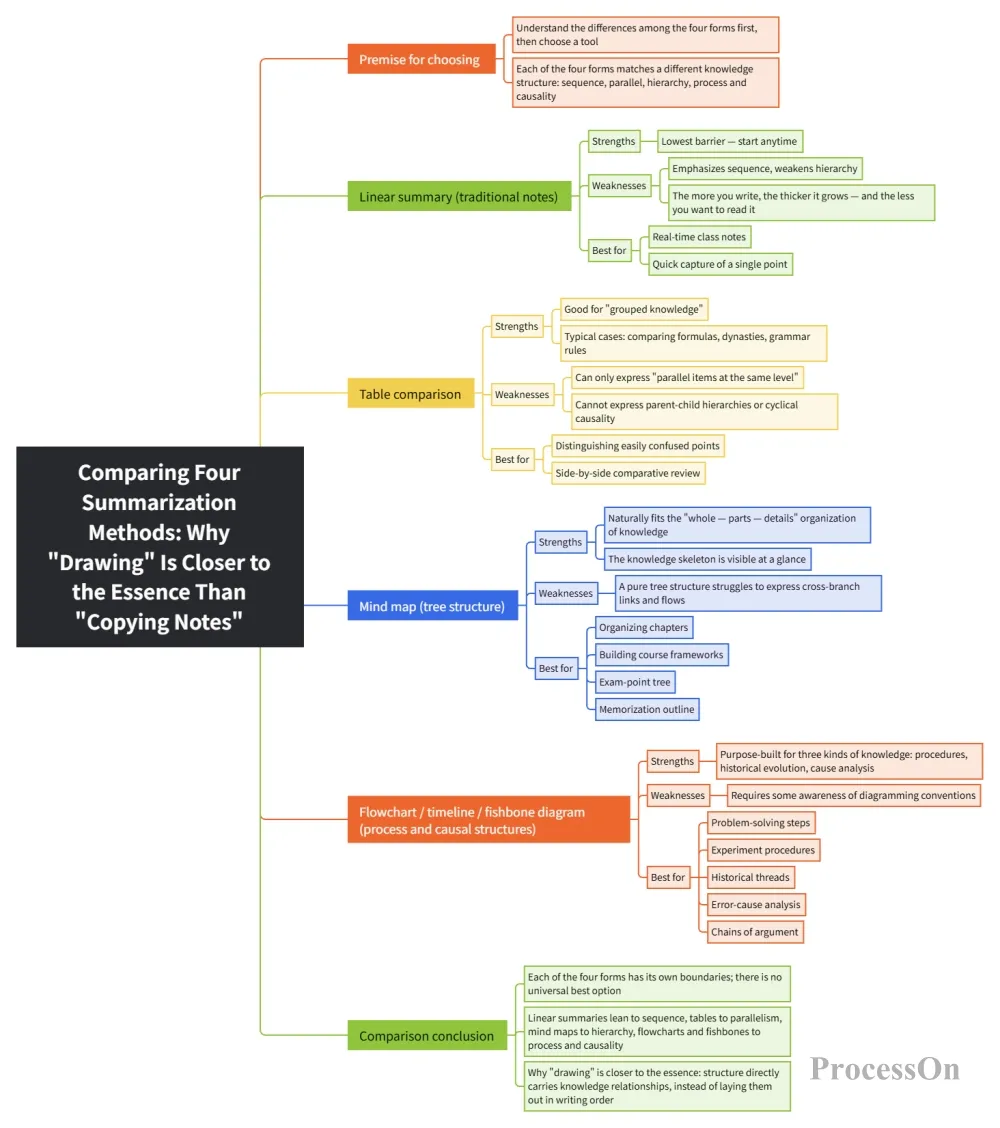
Why drawing is closer to the essence than copying notes
Key conclusion: different types of knowledge call for different types of diagrams.
In other words, a good knowledge-summarization tool cannot handle only one kind of diagram. This is exactly why many "single-purpose mind-map apps" fall short in real teaching scenarios — teachers need to explain experiment procedures, students need to organize historical chronologies, and teaching-research groups need to build exam models. Even one class spans four or five kinds of diagrams.
ProcessOn is an online diagramming and collaboration platform that works right in the browser, with no installation. Its capabilities cover exactly every diagram type mentioned above: mind maps, flowcharts, swimlane diagrams, BPMN, UML, sequence diagrams, Gantt charts, org charts, fishbone diagrams, timelines, matrix diagrams, Venn diagrams, ER diagrams, network topology diagrams, and dozens more.
Even more important, the AI capabilities upgraded in 2026 have pushed the cost of "turning thick materials into knowledge structures" down to almost nothing. The following five scenarios are the most frequently reused in educational knowledge summarization.
Pain point: in the first week of term, facing a 400-page textbook and a 16-week schedule, you have no idea where to start.
How: create an "AI-generated mind map" in ProcessOn and enter a one-sentence topic description, e.g., "Generate a framework for advanced mathematics covering six modules — limits, derivatives, differentials, integrals, differential equations, and series — and label the core theorem of each module."
The AI directly produces a complete mind map with a central topic, first-level nodes, and multi-level branches, fully editable afterward. What you get is not a blank canvas but a "first-draft skeleton" you can add to and trim.
Value: "building a framework from 0 to 1" becomes "revising one from 0.8 to 1." The time saved should go into judging "is this framework right, is anything missing" — that is the real act of learning.
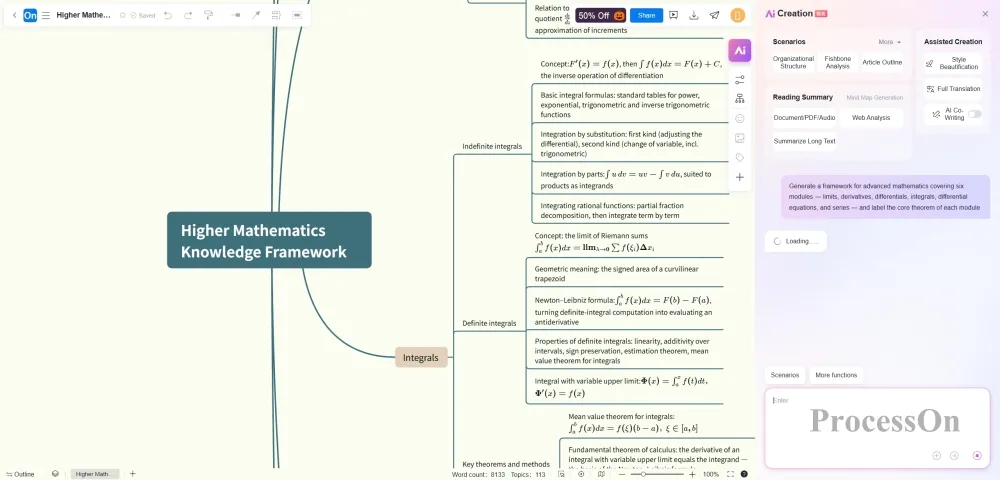
Higher Mathematics Knowledge Framework
This is ProcessOn AI's most differentiated capability in education. It generates not only from a sentence, but from existing materials:
The third option is especially valuable in certain situations. For example, a student who missed several classes due to illness or an internship may — with the teacher's and relevant parties' permission — transcribe the class recording into text, generate a mind map, and share it with classmates for review.
The whole process forms one complete chain:
Classroom teaching → audio recording → text recognition → AI organization → mind map
What you end up with is not scattered classroom photos or scrawled notes, but a structurally organized course knowledge framework.
One kind of knowledge is the hardest to summarize: it has a strict order, and one wrong step ruins everything.
Flattened into a mind map, such knowledge becomes a list of parallel items, losing the two core pieces of information: "order" and "decision branches."
Flowchart symbols are standardized: rectangles = operation steps, diamonds = decision branches, arrows = flow. The symbol system itself carries meaning — students can tell from the diagram where a judgment is mandatory and which path is the exception handler.
ProcessOn supports AI generation of flowcharts from text. Enter something like "Flowchart of the three stages of cellular respiration — glycolysis, the citric acid cycle, and the electron transport chain — labeling the location and ATP yield of each stage," and the AI produces a structured flow; then just fine-tune the details by hand.
Extra educational value: drawing a flowchart forces students to answer "what is the input of this step, what is the output, and what happens if it fails." Many "I thought I understood this" spots are exposed the moment you draw them.
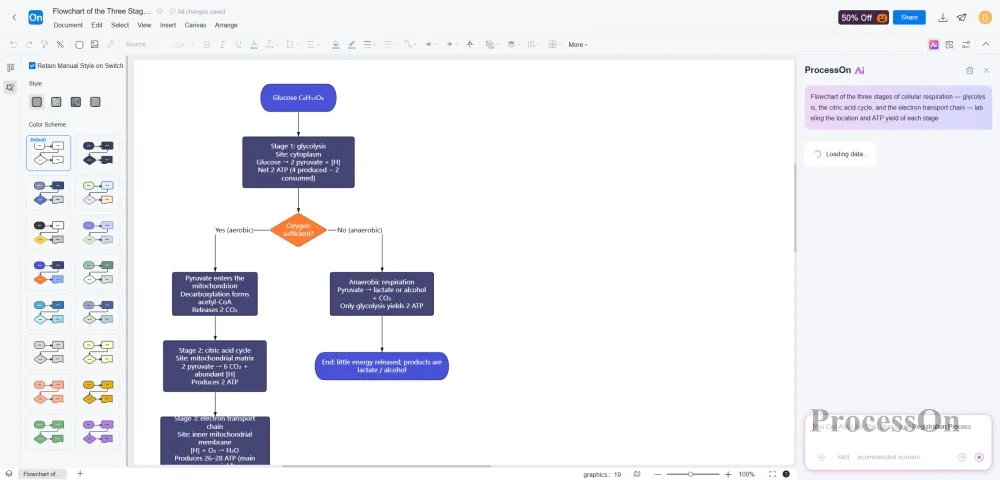
Flowchart of the Three Stages of Cellular Respiration
History, literary history, the history of philosophy, the history of technology, policy evolution — the memory difficulty of such knowledge is never "failing to remember events," but failing to remember the causal chains between them.
"Opium War → Self-Strengthening Movement → defeat in the Sino-Japanese War → Hundred Days' Reform." Remembering these four events individually is easy; but the moment someone asks "why did the Self-Strengthening Movement fail," you need the causal chain.
In ProcessOn, timelines and mind maps convert with one click: first generate a mind map to sort out the modules, then switch to timeline view to arrange chronological order; or expand timeline nodes into branches to add background, figures, and impact.
This "one body of content, multiple views" capability is especially useful during review:
Maintain the content once; switch views as needed.
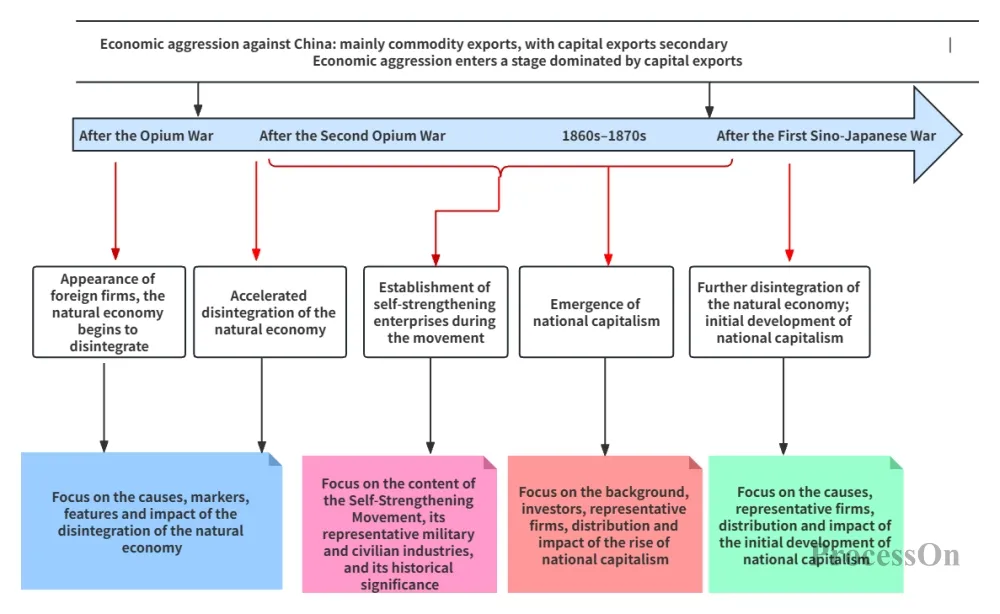
Changes in China’s Economic Structure after the Opium War
This is the most underestimated usage, and the dividing line between "knowledge summarization" and an "error logbook."
An error logbook records "which problems I got wrong"; a fishbone diagram answers "why do I keep getting this type wrong."
How: write "losing points on function problems" in the center, split the main bones into "unclear concepts / calculation slips / misreading the question / running out of time / psychological factors," and hang concrete examples under each bone.
When you finish, you will see a counterintuitive conclusion: most people's lost points concentrate on 2 bones rather than spreading evenly. From then on, review should target only those 2 bones — not more full practice sets.
Tools are the means; the workflow is the method.
Step 1 | Build the skeleton (10 minutes)
Have AI generate a mind map of the chapter from one sentence, keeping only first- and second-level nodes. Don't chase details — just "see how many blocks this chapter has."
Step 2 | Fill in the flesh (20 minutes after class)
Against the textbook and class notes, add third-level nodes: definitions, formulas, typical problem types, common pitfalls. Rule: put only "keywords" on the map, never full sentences. If it fits in one sentence, you don't know it well enough yet.
Step 3 | Switch diagram types (depending on the knowledge type)
Step 4 | Recite with the map closed (the check step)
Close the map, redraw the backbone from memory on blank paper, then reopen and compare for gaps.
This is where "knowledge summarization" actually takes effect — the diagram is not for showing people; it is a retrieval index for your brain.
Deliverable 1 | Unit knowledge map (for students)
One diagram covering the whole unit: core concepts, formulas and theorems, typical example types, common mistakes. At final-exam review time, send out this one diagram instead of a dozen pages of review outlines.
Deliverable 2 | Teaching-process and lesson-explanation diagram (for yourself / the teaching-research group)
Use a swimlane diagram to split "teacher activity / student activity / assessment"; a lesson's logic can no longer be vague on the diagram. During peer review, flaws in a diagram are easier to spot than flaws in the lesson-plan prose.
Deliverable 3 | Visualized two-way test specification (for the exam-setting team)
Spread "knowledge points × cognitive levels" across a matrix diagram, and you can immediately see which content is over-tested and which cognitive level is missing. A table can do this too, but a matrix shows the imbalance at a glance.
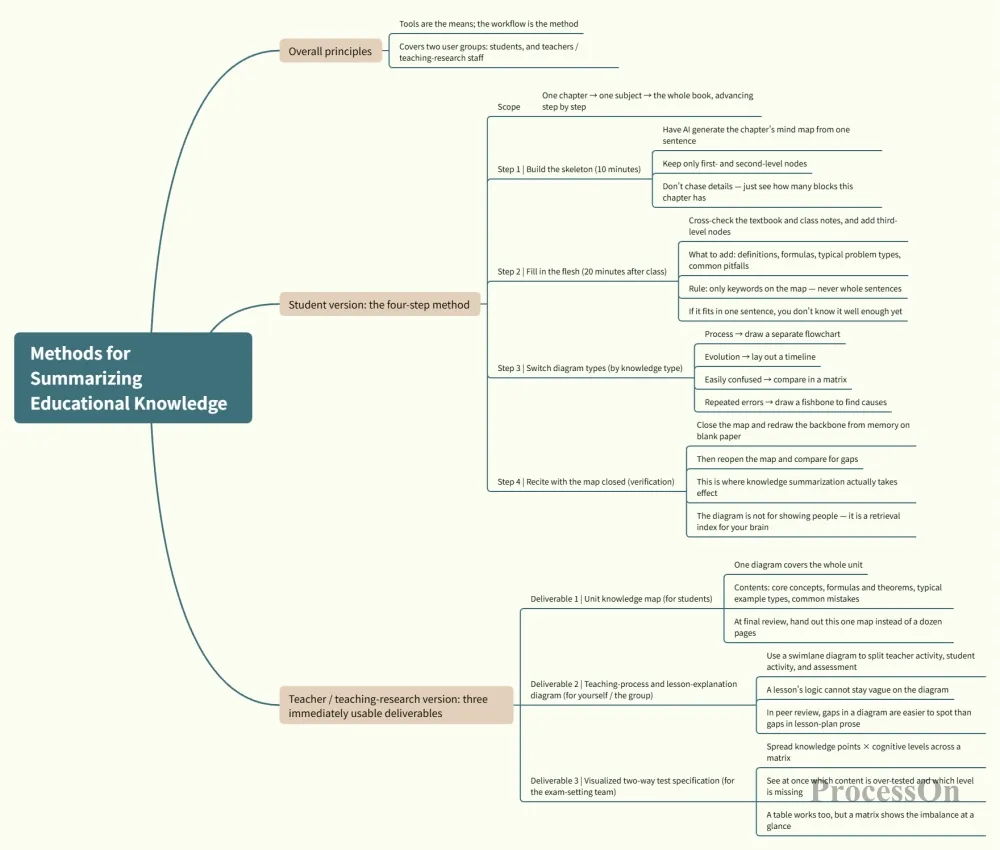
Methods for Summarizing Educational Knowledge
There's a hidden rule in educational knowledge summarization: a structure organized by one person always has blind spots.
ProcessOn supports real-time multi-user collaboration, comments, permission settings, and version-history rollback. Concretely:
Version history matters here: mistakes can be rolled back, so students dare to edit — and only then do they truly put the diagrams to use.
A very real problem: schools and companies already hold materials in wildly varied formats.
ProcessOn handles this quite pragmatically:
What this means for education:
1.Migrating from XMind: no need to abandon existing maps — import them directly and keep editing
2.Handing to teachers / supervisors: export as PDF or PPT; anyone can open it
3.Into lesson plans / papers: export Word or SVG vector graphics that print without distortion
4.Making courseware: export as PPT and embed directly into classroom presentations
Also, the free version allows creating 9 files with no limit on node count — plenty for users who want to "try it first and see if it suits them." The template community offers large numbers of Chinese-language templates across learning, technology, and management categories that you can clone and modify — no need to start from a blank page.
One practical suggestion: don't start by trying to "move every subject onto it." Pick the subject you struggle with most, complete one full chapter with the four-step method above, and run one complete loop. Only then expand to the second subject. A tool's value only shows itself inside a complete loop.
Pitfall one: the prettier the diagram, the better
Colors, themes, and icons do not improve memory. Clear structure > visual polish. Spend the time saved on formatting on reciting with the map closed instead.
Pitfall two: fitting a whole book into one diagram
Beyond 200 nodes, a diagram loses its "scannability" and becomes another form of information overload. The right approach is layered maps: an overview map (20 nodes) → chapter maps (50 nodes) → topic maps. Connect them with links or labels instead of stuffing everything onto one canvas.
Pitfall three: drawing but never reviewing
If the output of educational knowledge summarization never enters a review cycle, it is just "neatly organized waste paper." At minimum: review the backbone once a week, and before each exam look only at the diagrams, not the textbook. A diagram's mission is to be retrieved repeatedly, not to be collected.
Educational knowledge summarization is not about "tidying content"; it is about translating linear input into a networked structure, then fixing it in place with visualization.
ProcessOn's value is not "it can draw diagrams," but that one platform covers all of the diagram types above and uses AI to minimize the cost of "from materials to structure" — you don't have to jump between five apps, nor start from a blank canvas.
One diagram that explains a whole chapter beats ten pages of notes copied ten times.
You can use it as a high-quality first draft, but it is not advisable to treat it as the final result.
The framework AI generates reflects generic public knowledge structures; it doesn't know your exam focus, what your teacher emphasizes, or your own weak spots. The correct use: AI provides the skeleton, and you make the judgments and additions.
The test is simple: after generation, if you can point out "these three should be deleted, these two are missing," the feature is working for you; if you accept it wholesale, you haven't yet entered a true state of summarization.
The free version allows creating 9 files with unlimited nodes, supports basic diagramming and collaboration, and exports basic formats like PNG and JPG.
How to judge whether it's enough:
Also, on most platforms students and teachers can look for education-discount channels — worth checking before upgrading.
Practical advice: keep a single map within 200 nodes; split beyond that.
A recommended three-layer structure:
1.Overview map (about 20 nodes): all chapters and core exam points of a subject, for quick pre-exam locating
2.Chapter map (about 50 nodes): one chapter's concepts, formulas, problem types, and pitfalls
3.Topic map (as needed): deep-dive a single difficult point, e.g., "all types of derivative application problems"
Link the three layers with links, labels, or naming conventions (e.g., Calculus-03-Derivative-Applications) to form a navigable knowledge system instead of one ever-growing canvas.
Three levels of handling:
After adjusting, do one unified styling pass at the end — don't tweak formatting while you draw.