Process Type
Graphical expression
Mind Type
Structured expression
Note Type
Efficient expression
Treemap
Bracket Diagram

Default Mode





In education systems worldwide, group projects have become a crucial way to train students' communication skills, project thinking, and collaboration abilities. Whether it's project-based learning in the US, seminar group work common in European universities, or large-scale course projects in Asian universities, group projects share a common characteristic: theoretically everyone participates, but in practice, they are often chaotic, inefficient, and stressful.

If we compare group assignments to a "small team project," then the reason for their failure is often not a lack of ability, but rather—unclear collaboration methods, unclear processes, and inconsistent tools. To truly complete group projects efficiently and comprehensively, it's essential to simultaneously consider organizational methods, communication pace, task transparency, and the final integrated presentation.
This article will begin by discussing the most typical pain points of group projects, then move on to practical methods, and finally, combine this with a real-world, usable tool example to truly implement team collaboration.
Although different countries and education systems have their own characteristics, students around the world encounter almost the same problems in group assignments:

Student group assignment bracket diagram
Some students prefer email, others instant messaging, and still others upload materials to the classroom system. Over time, version inconsistencies, lost documents, and uncertainty about the latest information become common problems.
Many groups did not clearly define who was responsible for what at the beginning, resulting in:
This is precisely the most typical source of frustration in group collaboration.
In cross course groups, members' schedules may be completely inconsistent. Time zones, course schedules, part-time jobs, and club activities can all make it difficult for teams to find a common work window.
Even if everyone works hard to complete their respective parts, piecing together a unified, logical, and stylistically consistent final product remains extremely challenging. Different writing habits, inconsistent formats, and repetitive or contradictory viewpoints can make the integration phase the most time-consuming part.
Many teams lack clear task diagrams, structure diagrams, or project frameworks, leading to members having "different perspectives" on the overall project, which in turn results in:
These pain points are not new, yet they occur in almost every generation of students. However, they can actually be resolved by building a clear and transparent collaborative environment.
Regardless of which country you study in or what type of group project you undertake, to ensure reliable and smooth group collaboration, you can follow these principles:

The core principles for making group projects efficient
This includes materials, documents, references, project structures, meeting minutes, etc. The biggest advantage of centralization is:
Use a graphical representation to illustrate the overall structure, for example:
When the project structure is clear and visible, members will naturally enter the state faster.
For example, the statement "someone is responsible for the background" is too vague and should be refined to:
Only when it is clearly defined to this extent can it be considered a real task.
Transparent progress status can reduce internal friction and allow group cooperation to progress naturally, rather than having the team leader or responsible classmates constantly ask, “ Where did you do? ”
Distribute the integration pressure throughout the project, rather than cramming it all onto the last day.
To meet these principles, we need a tool that truly enables synchronous collaboration, presents a structured view, and centralizes all data. ProcessOn is such an online collaboration platform; it's a graphical collaboration tool used globally and is ideal for student group projects.
Instead of presenting it in a fragmented manner, this section will explain in terms of scenarios what problems it can solve and how it solves them:
In the first meeting, the group often discusses the direction and outlines the plan, but oral discussions are prone to confusion.
In ProcessOn, groups can collaboratively edit mind maps online :

Once this structure is established, the group's direction will no longer waver.
Use ProcessOn's mind mapping feature to break down tasks ; this can be done using tree diagrams, organizational charts, or basic mind maps.
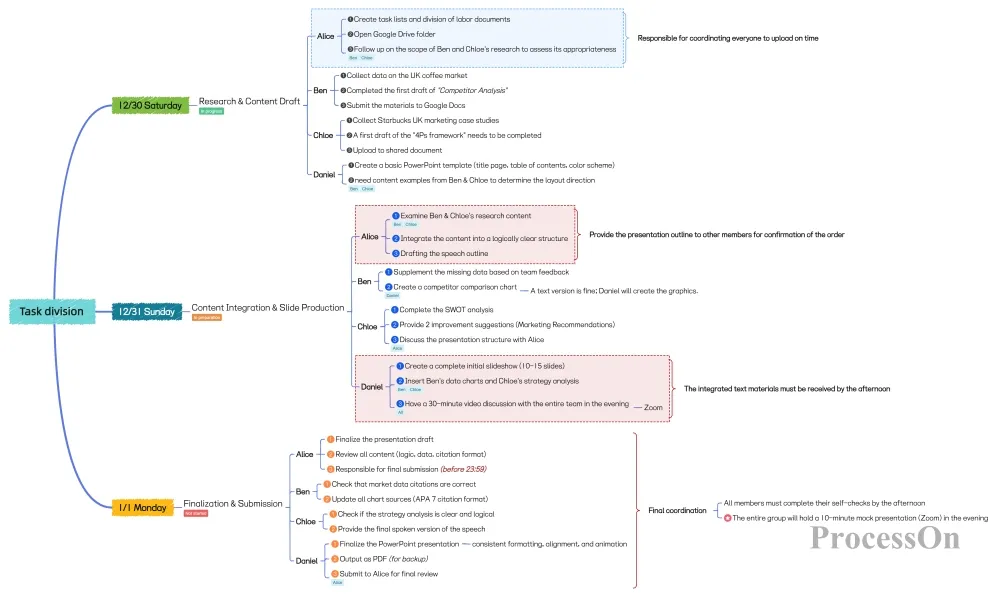
Group assignment task division
In this way, the team does not need to manually track progress, and everyone's responsibilities and progress are clearly visible.
In most university environments, even if group members are located on the same campus, it is still difficult to ensure that all members hold offline meetings at the same time and place due to factors such as course schedules, lab classes, internships, part-time jobs, and club activities.
The advantages of ProcessOn are:
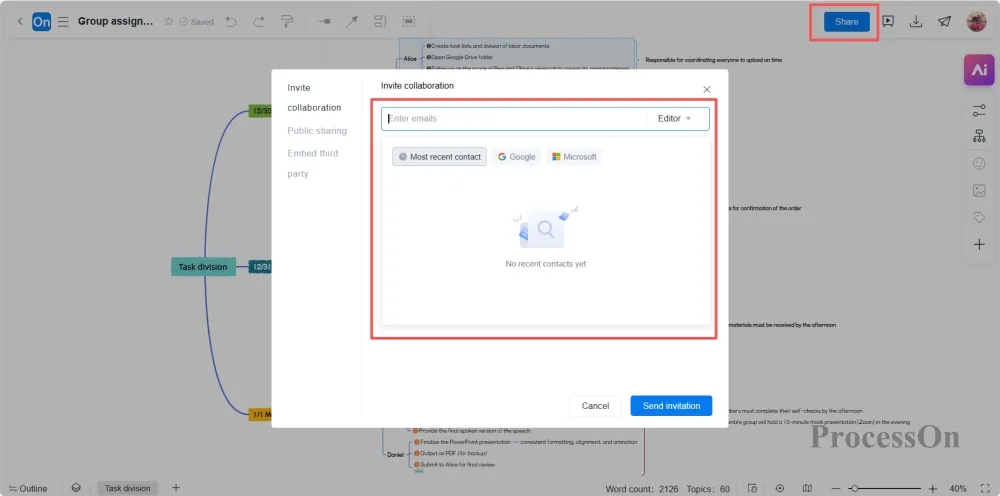
Collaboration is possible through sharing; there's no need to wait for someone to be online to make progress.
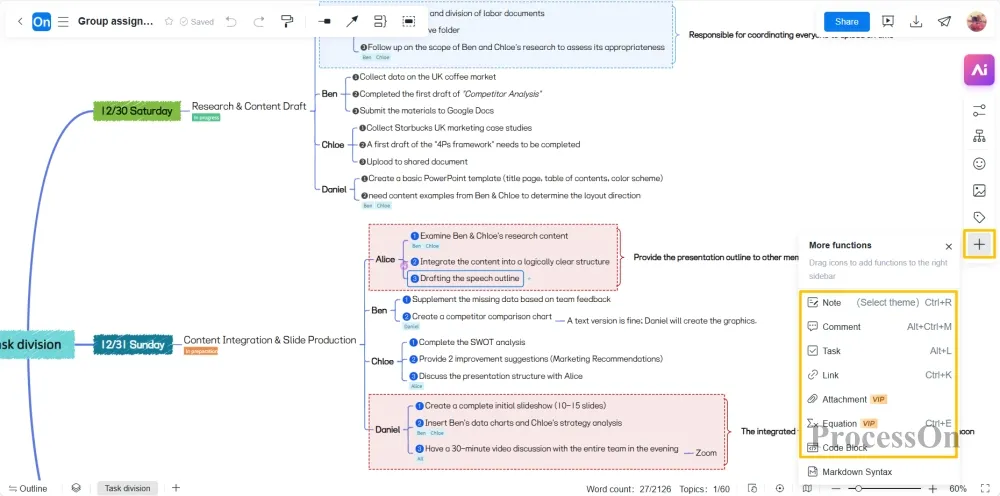
All the thoughts and materials in the group are in one picture, so there won't be any awkward situations like "Who saved the latest version?"
Once the mind map, the group can:
Finally, the content can be exported and included as part of the report material.
In today's learning environment, group assignments have transcended the simple concept of "multiple people completing a task," and are more like real-world team project practice. It requires:
With the right collaboration methods and appropriate tools, group projects can not only alleviate the pain, but also become a training ground for cultivating future professional skills.
ProcessOn's core value lies in enabling the entire team to "see the same blueprint," thereby reducing misunderstandings, lowering communication costs, and allowing members to truly collaborate rather than work independently.
When the structure is clear, responsibilities are well-defined, and collaboration is smooth, group projects can not only be completed efficiently, but also become a rewarding growth experience.