
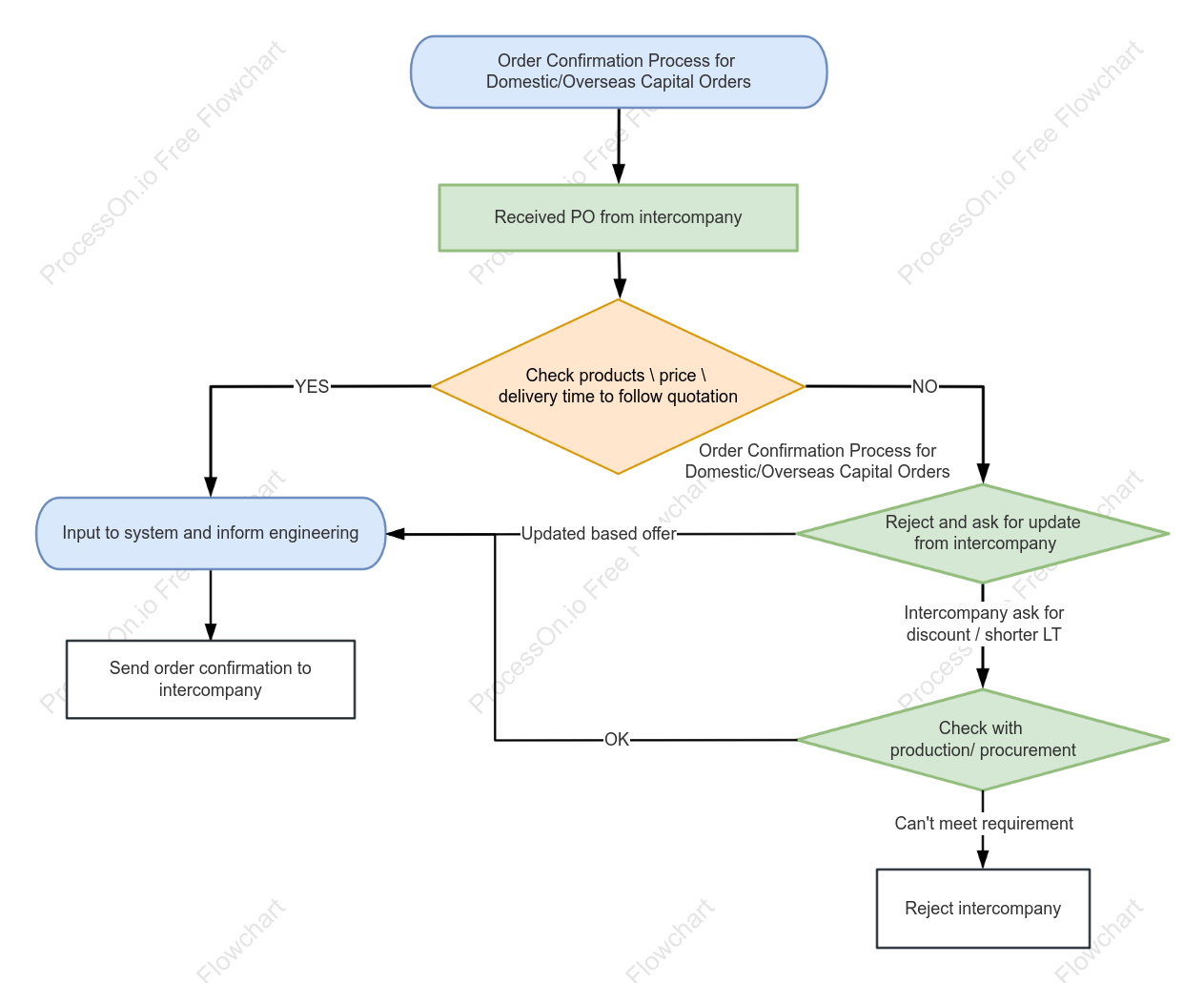

Internal Order Confirmation Process Flowchart
1 Report
This is a flowchart illustrating the internal order confirmation process. The process begins with the receipt of a purchase order from an affiliate company. First, the product details, pricing, and delivery schedule are verified against the original quotation. If they match, the order is entered into the system, the Engineering Department is notified, and an order confirmation is sent to the affiliate. If the verification fails, the order is initially rejected with a request for updates. Should the affiliate propose new terms—such as discounts or shortened delivery times—further coordination with the Production or Purchasing departments is required; if the requests can be met, the order is entered into the system based on the updated terms and confirmed, whereas if they cannot be met, the affiliate's order is ultimately rejected.
Related Recommendations
Other works by the author
Outline/Content
See more
Intercompany ask for discount / shorter LT
Send order confirmation to intercompany
OK
Order Confirmation Process for Domestic/Overseas Capital Orders
Updated based offer
NO
YES
Received PO from intercompany
Input to system and inform engineering
Check with production/ procurement
Can't meet requirement
Check products \\ price \\ delivery time to follow quotation
Reject and ask for update from intercompany
Reject intercompany
Order Confirmation Process for Domestic/Overseas Capital Orders
Collect
Collect
Collect
Collect

0 Comments
Next Page