
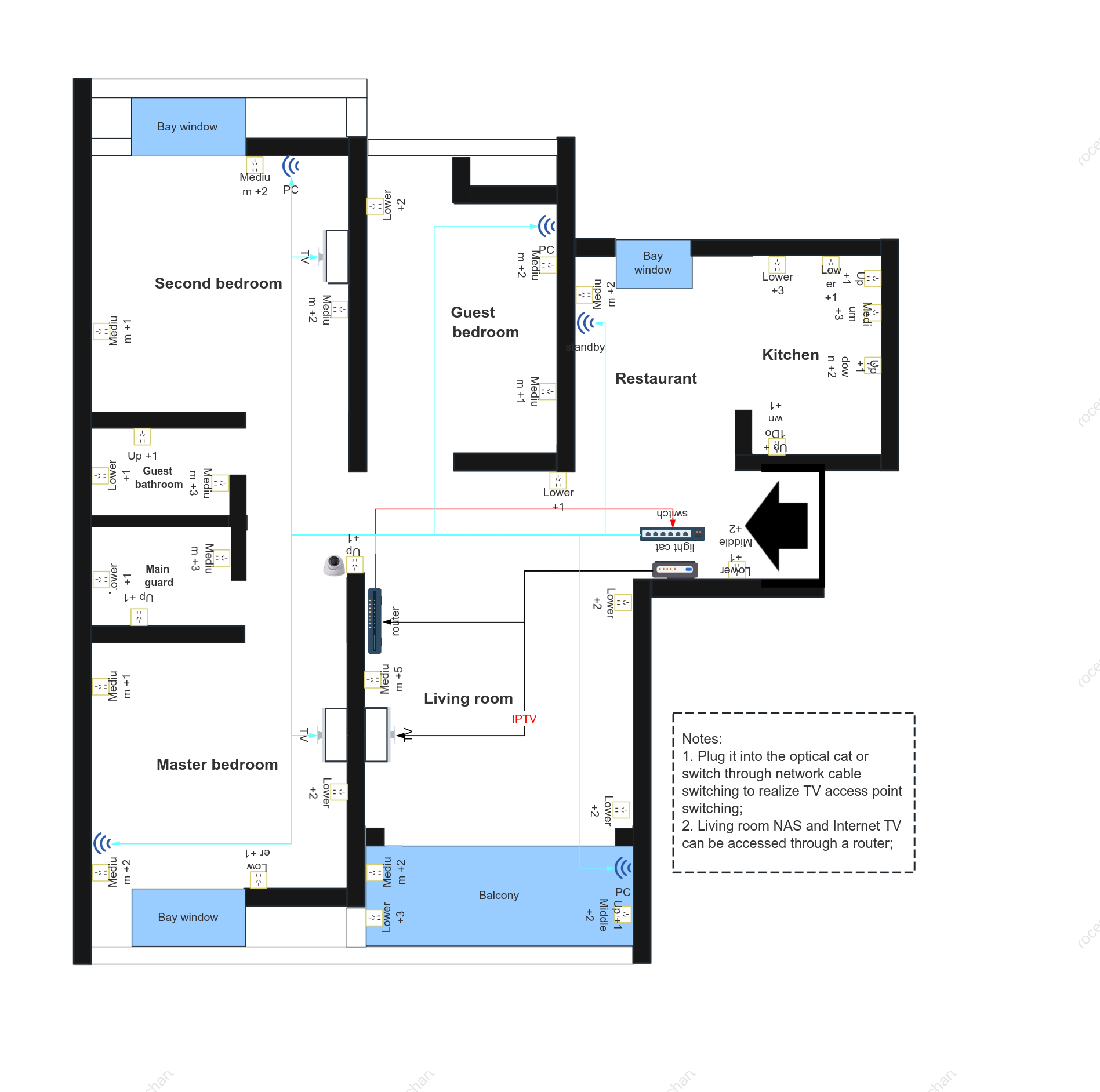

Home network topology diagram - deployment point diagram
0 Report
This diagram depicts a typical home network layout, showing the detailed location of all network devices and connection points. In this core network document, you can observe each key component of the network architecture, such as routers, switches, and wireless access points. The connections between devices clearly indicate the data flow path, ensuring the stability and efficiency of the entire network. **File Type:** Network Topology Diagram For ease of understanding, the diagram uses clear and intuitive graphical elements and icons to represent different network devices. The home floor plan in the background clearly shows the walls, furniture, and equipment distribution in each room, making the location of network deployment points precise and easy for technicians or family members to use for network installation or troubleshooting. Furthermore, the labeling and annotation of key devices increases the document's professionalism and practicality. **Modifiers:** - "Typical Home Network Layout": Emphasizes that this topology diagram represents the network setup of a typical home. - "Clear and Intuitive Graphical Elements": Highlights that the diagram presents complex information in a simple and easy-to-understand way. - "Precise Location": Emphasizes the accurate labeling of each network point, making deployment more precise.
Related Recommendations
Other works by the author
Outline/Content
See more
standby
Medium +1
Master bedroom
Medium +2
PC
Lower +1
Lower +3
Balcony
Lower +2
Bay window
Main guard
Up +1
TV
Medium +3
Medium +5
Notes:1. Plug it into the optical cat or switch through network cable switching to realize TV access point switching;2. Living room NAS and Internet TV can be accessed through a router;
switch
light cat
Guest bathroom
IPTV
Kitchen
Second bedroom
Up +1Down +1
Living room
Up +1Middle +2
Lower +1Middle +2
Up +1 down +2
Guest bedroom
router
Restaurant
Collect
Collect
Collect
Collect
Collect
Collect
Collect

0 Comments
Next Page