
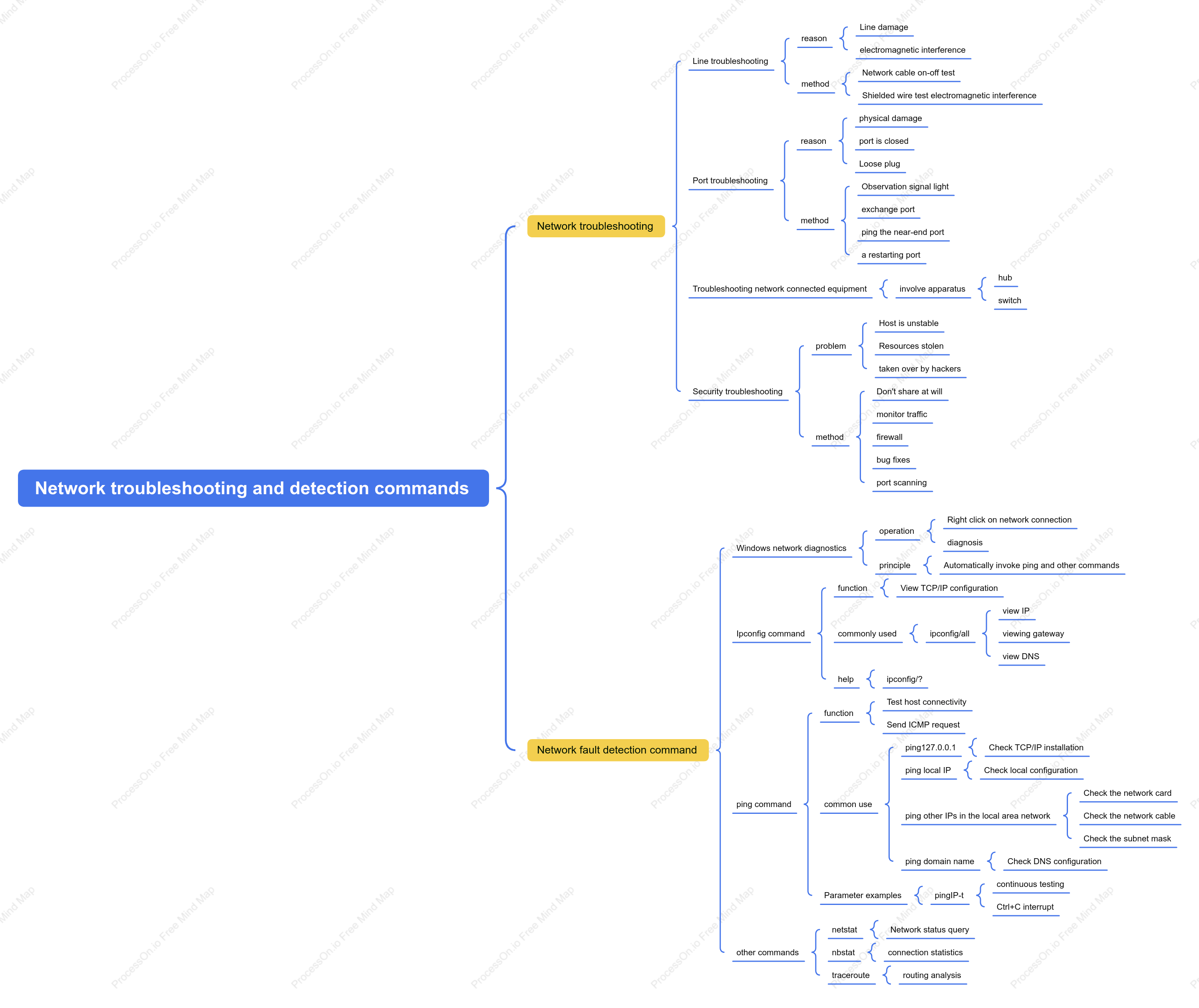

Network troubleshooting and detection commands
0 Report
Network troubleshooting and detection are core skills in system operation and maintenance and network management. To quickly locate and resolve issues such as network latency, packet loss, route interruptions, or port outages, administrators need to utilize a series of classic command-line tools. This chapter will detail the practical usage and output interpretation of commands such as ping, traceroute/tracert, netstat, nslookup, telnet, tcpdump, and curl. By combining the detection logic of these commands with common fault characteristics, readers can establish a systematic troubleshooting approach from the physical link to the application layer, thereby efficiently diagnosing and restoring services in complex network environments.
Related Recommendations
Other works by the author
Outline/Content
See more
Network troubleshooting
Line troubleshooting
reason
Line damage
electromagnetic interference
method
Network cable on-off test
Shielded wire test electromagnetic interference
Port troubleshooting
reason
physical damage
port is closed
Loose plug
method
Observation signal light
exchange port
ping the near-end port
a restarting port
Troubleshooting network connected equipment
involve apparatus
hub
switch
Security troubleshooting
problem
Host is unstable
Resources stolen
taken over by hackers
method
Don't share at will
monitor traffic
firewall
bug fixes
port scanning
Network fault detection command
Windows network diagnostics
operation
Right click on network connection
diagnosis
principle
Automatically invoke ping and other commands
Ipconfig command
function
View TCP/IP configuration
commonly used
ipconfig/all
view IP
viewing gateway
view DNS
help
ipconfig/?
ping command
function
Test host connectivity
Send ICMP request
common use
ping127.0.0.1
Check TCP/IP installation
ping local IP
Check local configuration
ping other IPs in the local area network
Check the network card
Check the network cable
Check the subnet mask
ping domain name
Check DNS configuration
Parameter examples
pingIP-t
continuous testing
Ctrl+C interrupt
other commands
netstat
Network status query
nbstat
connection statistics
traceroute
routing analysis
Collect
Collect
Collect
Collect

0 Comments
Next Page